A change order is a formal document used to record and approve changes to an existing project contract. It helps project owners, contractors, and other stakeholders document adjustments to the original scope of work, contract price, project schedule, or other agreed terms. By putting changes in writing, everyone can understand what is changing and how the revision may affect the project.
Change orders are common in construction, renovation, engineering, consulting, and other projects where requirements can evolve after work begins. A client may request an additional feature, a contractor may discover an unexpected site condition, or a design revision may affect the materials and labor required. Without a clear approval process, these changes can lead to misunderstandings, cost disputes, and delays.
In this guide, you’ll learn what a change order is, when to use one, which details to include, and how to manage the approval process. You’ll also find a practical checklist, common mistakes to avoid, and answers to frequently asked questions.
What Is a Change Order?
A change order is a written amendment or project document that records an agreed change to an existing contract. Depending on the contract and industry, it may modify the scope of work, price, completion date, materials, specifications, or other project requirements.
For example, a homeowner may ask a contractor to add built-in shelving during a kitchen renovation. Because the additional work requires materials, labor, and time, the parties can use a change order to describe the new work, establish the additional cost, and revise the schedule.
A change order commonly identifies:
- The project and original contract
- The change order number and date
- A detailed description of the requested change
- The reason for the change
- Any additions or reductions to the contract price
- The impact on the project schedule
- Revised specifications or supporting documents
- Approval signatures or other required authorizations
A change order should be consistent with the original contract and the project’s change-management procedures. Depending on the contract, a change may not be authorized until the required parties have approved it in the required form.
Why Is a Change Order Important?
Project changes can affect costs, deadlines, responsibilities, and the final deliverable. A documented change order helps manage those effects before the revised work proceeds.
1. Prevents Scope Confusion
A clear description identifies the additional, revised, or removed work. This helps prevent disagreements about what the contractor is expected to deliver and which tasks remain part of the original contract.
2. Documents Cost Adjustments
A change order records additional charges, deductions, and other agreed financial adjustments. It can explain how the revised amount was calculated and how the change affects the overall contract price.
3. Tracks Schedule Changes
Some changes require extra time for materials, labor, design, or inspections. A change order can document the number of additional days and establish a revised completion date when the parties agree to one.
4. Creates a Written Record
Keeping approved change orders with the original contract provides a record of how project requirements evolved. This documentation can be useful for project reviews, payment discussions, audits, and resolving disagreements.
5. Improves Communication and Accountability
A formal approval process makes it easier for owners, contractors, subcontractors, and project managers to understand the revised requirements. It also clarifies who authorized the change and when the authorization occurred.
When Should You Use a Change Order?
A change order may be appropriate whenever a proposed revision affects a contractual obligation. The exact procedure depends on the original agreement, so check the contract before approving or starting changed work.
Additional Work Requested by the Client
A client may request extra rooms, additional features, new fixtures, or expanded services after the project has started. The change order should identify the extra work and any associated cost or schedule adjustment.
Design or Specification Changes
Revisions to drawings, materials, dimensions, finishes, or technical requirements may affect the work already planned. Document the revised specifications and attach updated plans when necessary.
Unexpected Site Conditions
Construction and renovation projects may uncover concealed damage, unsuitable soil, outdated wiring, or other conditions that were not apparent during initial planning. A change order can document the proposed response, subject to any inspection, notice, or approval requirements in the contract.
Material or Equipment Substitutions
A specified product may become unavailable or unsuitable. If the parties agree to use an alternative, document the replacement, its specifications, any price difference, and its effect on delivery or installation dates.
Schedule Adjustments
Changes in scope, approvals, site access, or material availability may require a revised schedule. If the change affects a contractual milestone or completion date, record the agreed adjustment and its basis.
What Should a Change Order Include?
A well-prepared change order should make the revision understandable to someone who was not involved in the original discussion. The following sections cover the information commonly included in a change order form.
1. Project and Contract Information
Include the project name, location, original contract number, contract date, owner or client, and contractor. This information connects the change order to the correct agreement and project records.
2. Change Order Number and Date
Assign a unique number to each change order and record the date it was issued. A consistent numbering system helps everyone track revisions and avoid confusion when a project has multiple changes.
3. Description of the Change
Describe exactly what will be added, removed, or revised. Use specific language rather than broad phrases such as “extra work” or “design update.”
Where appropriate, identify:
- The affected work area or project phase
- The new materials, equipment, or specifications
- The work being removed or replaced
- Any relevant drawing or document references
- The expected deliverables and acceptance requirements
4. Reason for the Change
Record why the revision is needed. Common reasons include a client request, design revision, unforeseen condition, regulatory requirement, material substitution, or schedule adjustment.
Explaining the reason provides context for future reviews and helps the project team understand the circumstances behind the decision.
5. Contract Price Adjustment
Show the additional costs and deductions associated with the change. Depending on the project, the calculation may include labor, materials, equipment, subcontractor charges, and other contractually permitted costs.
State the net price adjustment and, when applicable, the revised total contract value. Make sure the calculation is clear and supported by the pricing method required by the original agreement.
6. Schedule and Completion Date
State whether the change affects the project timeline. If additional time is agreed, identify the number of days and the revised milestone or completion date. If there is no schedule impact, say so when appropriate.
7. Supporting Documents
Attach relevant revised drawings, specifications, estimates, schedules, or other records. Refer to each attachment clearly so the approved change can be understood without relying on informal messages.
8. Terms and Conditions
Clarify any additional terms relevant to the revision. The document may also explain how the change interacts with the original contract and whether any existing terms remain unchanged, subject to the agreement and applicable law.
9. Approval and Signatures
Include the names, roles, signatures, and dates of the parties or representatives whose approval is required. Follow the authorization rules in the original contract, including any requirements for written approval or electronic signatures.
How to Create a Change Order Step by Step
A consistent process helps ensure that project changes are reviewed, priced, and authorized before the revised work proceeds.
Step 1: Identify the Requested Change
Record the request as soon as it arises. Identify who requested it, what needs to change, and why the current contract does not already cover the proposed work.
Step 2: Assess the Impact
Review how the change affects labor, materials, equipment, subcontractors, safety, quality, and project deadlines. Consult the relevant team members if the revision affects technical requirements or other work packages.
Step 3: Calculate the Cost
Prepare a clear estimate using the pricing method required by the contract. Separate additions from deductions and explain any assumptions that could affect the final amount.
Step 4: Evaluate the Schedule
Determine whether the change affects task sequencing, procurement, inspections, milestones, or the completion date. Document the expected impact and explain any dependencies that may cause further delays.
Step 5: Prepare the Change Order Form
Complete the project details, change description, reason, cost adjustment, schedule impact, and supporting document references. Use clear language so the parties can understand exactly what they are being asked to approve.
Step 6: Obtain Required Approval
Send the proposed change order to the authorized parties for review. Address questions or requested revisions before final approval. Do not assume that a verbal request or an unsigned draft satisfies the contract’s authorization requirements.
Step 7: Update Project Records
After approval, distribute the final document to the relevant project participants. Update the budget, schedule, work plan, and contract records as needed. Keep the approved change order with the original contract and related attachments.
Step 8: Verify Completion of the Revised Work
Check that the changed work matches the approved description and specifications. Record any required inspection, acceptance, or closeout information and confirm that related billing reflects the authorized change.
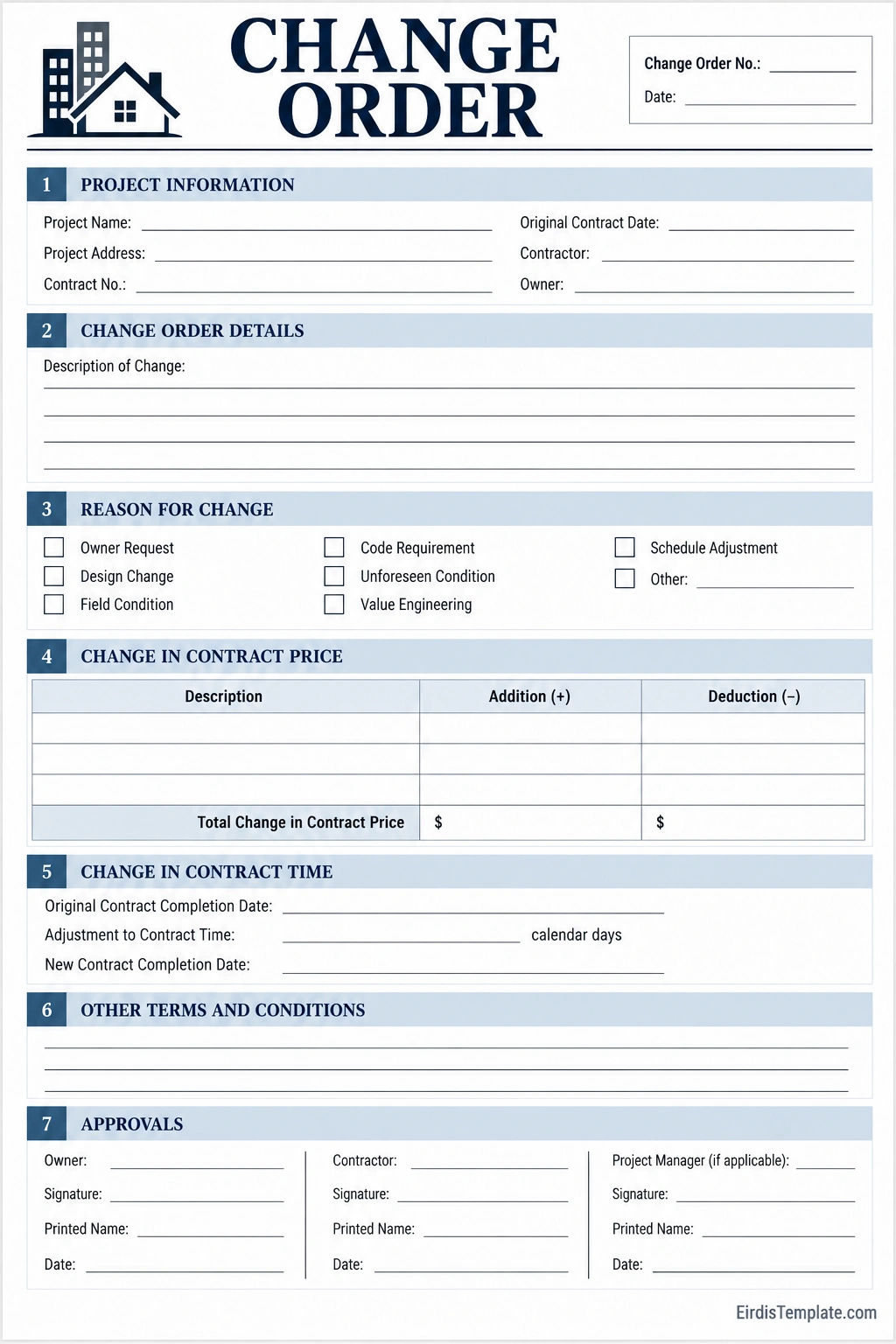
Change Order Example
Imagine a contractor renovating a home under an original contract. After work begins, the owner requests additional built-in cabinets that were not included in the original scope.
The contractor reviews the request and estimates the additional materials and labor. The new cabinets will also require extra installation time. Before beginning the additional work, the parties prepare a change order that records:
- Change requested: Add built-in cabinets in the kitchen.
- Reason: Owner-requested design addition.
- Price adjustment: The agreed additional cost, supported by the estimate.
- Schedule impact: The agreed extension, if any.
- Supporting documents: Revised cabinet drawings and specifications.
- Approval: Signatures or other authorization required by the contract.
This example shows how a change order turns a conversation into a documented revision. Both parties can review the cost, scope, and timing before the contractor proceeds with the additional work.
Change Order vs. Work Order
A change order and a work order serve different purposes, although their use can vary by organization and industry.
Change Order
A change order formally documents a revision to an existing contract or approved project scope. It may change the price, schedule, specifications, or other contractual terms.
Work Order
A work order typically instructs someone to perform a specific task or service. It may be used to schedule maintenance, assign work, or authorize activities within an existing agreement. A work order does not automatically amend a contract unless the applicable agreement and authorization process give it that effect.
Common Change Order Mistakes to Avoid
- Starting changed work too early: Follow the contract’s approval process before proceeding when authorization is required.
- Using vague descriptions: Specify exactly what is added, removed, or revised.
- Ignoring schedule effects: Assess the impact on milestones and completion dates.
- Leaving costs unexplained: Show additions, deductions, assumptions, and the net adjustment clearly.
- Forgetting supporting documents: Attach revised plans, estimates, or specifications when needed.
- Accepting approval from the wrong person: Verify who has authority to approve changes under the contract.
- Failing to update project records: Make sure the budget, schedule, and relevant teams reflect the approved revision.
- Not keeping a signed copy: Store the final change order with the original contract and related records.
Frequently Asked Questions About Change Orders
What is the purpose of a change order?
A change order documents an approved revision to an existing project contract. It can clarify changes to the scope of work, contract price, schedule, specifications, or other agreed terms.
Is a change order legally binding?
A change order may become contractually binding when it is properly authorized and satisfies the original contract and applicable law. The required signatures, approval process, and formalities depend on the agreement and jurisdiction.
Who can request a change order?
A project owner, client, contractor, or another authorized participant may request a change, depending on the contract. A request is not necessarily an approved change; the required review and authorization process still applies.
Does a change order affect the contract price?
It can. A change order may increase or decrease the contract price, or document a revision that has no price impact. Any adjustment should be clearly stated and calculated according to the applicable contract terms.
Can a change order extend the project deadline?
Yes. When a change affects the amount or sequence of work, the parties may agree to adjust the schedule. The change order should state the approved time adjustment and revised dates where applicable.
What happens if a contractor performs extra work without an approved change order?
The result depends on the contract, applicable law, and circumstances. Payment or schedule disputes may arise if the work was not authorized through the required process. Review the contract and document communications carefully before proceeding with disputed work.
Can a change order be canceled or revised?
A change order may sometimes be revised, replaced, or canceled, but the appropriate process depends on the contract and whether the change has already been approved or performed. Document subsequent changes and obtain any required authorization.
Conclusion
A change order helps project teams manage revisions to an existing contract in a clear and organized way. By documenting the revised scope, price, schedule, supporting information, and required approvals, it reduces uncertainty and creates a reliable record of the project’s agreed changes.
Before proceeding with changed work, review the original contract, assess the cost and schedule impact, prepare a detailed change order, and obtain the required authorization. Keep the approved document with the project records and communicate the revision to everyone affected.
A consistent change order process helps owners, contractors, and project managers maintain accountability while adapting to changing project requirements.
Download: Change Order Template

- Free Printable Chore Chart Template - October 27, 2026
- Childcare Enrollment Form Template - October 27, 2026
- Child Custody Agreement Template - October 27, 2026
