A work order is a formal document used to request, authorize, assign, and track a specific job. It turns a maintenance request, repair, inspection, installation, or other service need into a clearly defined task that can be assigned to the right person or team.
Instead of relying on informal conversations, emails, or verbal instructions, a work order creates a centralized record of what needs to be done, where the work will take place, who is responsible, what resources are required, and when the job should be completed.
A well-organized work order can improve communication, accountability, scheduling, resource planning, and record keeping. It can also provide useful historical information that organizations can use to identify recurring problems, evaluate maintenance activities, and improve operational efficiency.
What Is a Work Order?
A work order is a structured instruction or authorization for a specific job. It typically begins with a request and continues through assignment, scheduling, execution, and completion.
Work orders are commonly used for maintenance and repair activities, but their applications extend to many other types of work. A business might create a work order to repair equipment, inspect a facility, replace a component, perform preventive maintenance, install a new system, or complete a service request.
The document provides a shared reference for everyone involved. The person requesting the work can explain the problem, while the assigned worker or team can document what needs to be done and record the results.
What Is the Purpose of a Work Order?
The primary purpose of a work order is to turn a request into an actionable and trackable job. It establishes what work is required and provides the information needed to complete it efficiently.
A work order can help an organization:
- Formally document a work request.
- Define the scope of the job.
- Assign responsibility to an individual or team.
- Set priorities and target completion dates.
- Identify required labor, parts, materials, and services.
- Track work progress.
- Document completed work.
- Record problems or additional findings.
- Create a history of maintenance and repairs.
- Improve communication between departments.
By putting these details into one document, a work order can reduce misunderstandings and make it easier to follow a job from the initial request through completion.
When Should You Use a Work Order?
A work order can be useful whenever a job needs to be formally requested, assigned, scheduled, completed, and documented.
Maintenance
Maintenance departments can use work orders for routine inspections, preventive maintenance, equipment servicing, facility maintenance, and other scheduled activities.
Repairs
When equipment, machinery, buildings, or other assets require repairs, a work order can document the reported problem and provide instructions for resolving it.
Inspections
Work orders can be created for scheduled inspections of equipment, facilities, safety systems, or other assets that require regular evaluation.
Installation
Installing equipment, fixtures, systems, or components can be managed through a work order that specifies the required work, resources, responsible personnel, and completion requirements.
Service Requests
Internal departments can submit work orders when they need assistance from maintenance, facilities, IT, operations, or another service team.
Key Information to Include in a Work Order
A good work order form should contain enough information to allow the assigned team to understand and complete the job without unnecessary back-and-forth communication.
Work Order Number
A unique work order number makes it easier to identify and track individual jobs. It can also be useful when searching historical records.
Date Issued
The issue date indicates when the request was formally created. Depending on the organization, you may also want to include the requested date and scheduled start date.
Priority
A priority field helps the team determine how urgently the work should be handled. Common options include low, medium, and high priority.
Requester Information
Include the information needed to identify and contact the person who submitted the request.
- Requester name
- Department
- Phone number
- Email address
- Request date
Asset and Location Information
For maintenance and repair work, clearly identifying the affected asset is important. Include the equipment name, asset number, building, room, unit, or other location information when applicable.
Work Description
The work description explains what needs to be done. It should be specific enough for the assigned worker to understand the problem, requested service, or expected task.
For example, instead of writing “fix machine,” a more useful description could be “inspect the production machine because it is producing abnormal noise during operation and determine whether the drive belt requires replacement.”
Work Type
A work order may include a category such as:
- Maintenance
- Repair
- Inspection
- Cleaning
- Calibration
- Installation
- Replacement
- Safety check
- Upgrade
- Other service
Assignment
The assignment section identifies who is responsible for completing the work. Depending on the organization, this could be an employee, technician, department, contractor, or service team.
Required Resources
Some jobs require specific parts, materials, tools, equipment, or outside services. Listing these requirements in advance can help prevent delays.
Schedule
Include the planned start date and target completion date when scheduling is important. For larger jobs, additional milestones may also be appropriate.
Completion Information
Once the work is finished, the work order should provide space to record when the job was completed, what work was performed, and any important findings.
Signatures or Approvals
Signatures can provide confirmation that the request was authorized or that the completed work was reviewed and accepted, depending on the organization’s process.
How a Work Order Process Works
A work order typically moves through several stages. The exact process varies between organizations, but the basic workflow is often similar.
1. Submit the Request
The process begins when someone identifies a problem, service requirement, maintenance need, or other task that needs attention.
2. Review the Request
The responsible department reviews the request to determine its scope, priority, required resources, and appropriate handling.
3. Create the Work Order
The request is converted into a formal work order containing the relevant details and instructions.
4. Assign the Work
The work order is assigned to an appropriate employee, technician, contractor, or team.
5. Schedule the Job
The job is scheduled according to its priority, available resources, operational requirements, and target completion date.
6. Perform the Work
The assigned worker completes the job and records relevant information, including work performed, materials used, problems encountered, and additional findings.
7. Review and Complete
After the work is finished, the responsible person reviews the results, records the completion details, and closes the work order according to the organization’s procedures.
Work Order vs. Work Request
Although the terms are sometimes used interchangeably, a work request and a work order can represent different stages of the process.
A work request is generally a notification that someone needs a particular service or job. A work order is the formalized record used to authorize, assign, schedule, and track that work.
For example, an employee might submit a request stating that an air conditioning unit is not cooling properly. After the facilities team reviews the request, it may create a work order containing the equipment information, problem description, assigned technician, required parts, schedule, and completion record.
The distinction helps organizations separate the initial request from the actionable job.
Benefits of Using a Work Order
A structured work order system can provide several operational benefits.
Improved Communication
Everyone involved can refer to the same documented information instead of relying on separate conversations or messages.
Clear Accountability
Assigning a work order to a specific person or team makes responsibility easier to understand and track.
Better Scheduling
Target dates and priority information help managers organize work according to urgency and available resources.
Resource Planning
Identifying required parts, materials, labor, and services before work begins can reduce unnecessary delays.
Historical Records
Completed work orders can create a useful history of repairs, maintenance activities, inspections, and other operational work.
Operational Analysis
Over time, organizations can review work order data to identify recurring problems, frequently serviced assets, workload patterns, and opportunities for process improvement.
What Makes a Good Work Order?
An effective work order should be clear, specific, organized, and easy to follow. The person completing the work should be able to understand the requested task and its expected outcome.
Good work orders generally:
- Use a clear and specific job description.
- Identify the correct asset or location.
- Clearly identify the person or team responsible.
- State the priority when relevant.
- Include realistic scheduling information.
- Identify required materials and resources.
- Provide space for completion notes.
- Record important findings and exceptions.
- Maintain a consistent format across similar jobs.
Common Work Order Mistakes to Avoid
Poorly prepared work orders can create confusion and delays. Avoiding a few common mistakes can make the process significantly more effective.
- Vague descriptions: Avoid instructions that do not clearly explain the problem or requested task.
- Missing location details: Make sure the affected asset or work area can be easily identified.
- No clear assignment: Identify who is responsible for completing the work.
- Missing deadlines: Include a target date when the work needs to be completed within a particular timeframe.
- Ignoring required resources: Identify important parts, materials, equipment, or services in advance.
- Skipping completion notes: Document what was actually done rather than simply marking the job complete.
- Inconsistent information: Use standardized terminology for work types, priorities, assets, and departments.
Tips for Creating an Effective Work Order Template
A work order template should be designed around the organization’s actual workflow. Adding too many unnecessary fields can make the form difficult to complete, while leaving out important information can result in repeated questions and incomplete records.
Consider these practical tips:
- Use clearly labeled sections.
- Keep frequently used information near the top.
- Separate requester information from work details.
- Include a dedicated space for detailed instructions.
- Use checkboxes for common work categories and priorities.
- Provide enough room for completion notes.
- Include signature or approval fields where required.
- Give every work order a unique identification number.
- Keep the design easy to print and read.
- Review the template periodically and remove fields that are no longer useful.
Printable Work Order Template
A printable work order template can provide a simple way to standardize work requests without requiring specialized software. A paper form can be completed manually and then stored as part of the organization’s maintenance or service records.
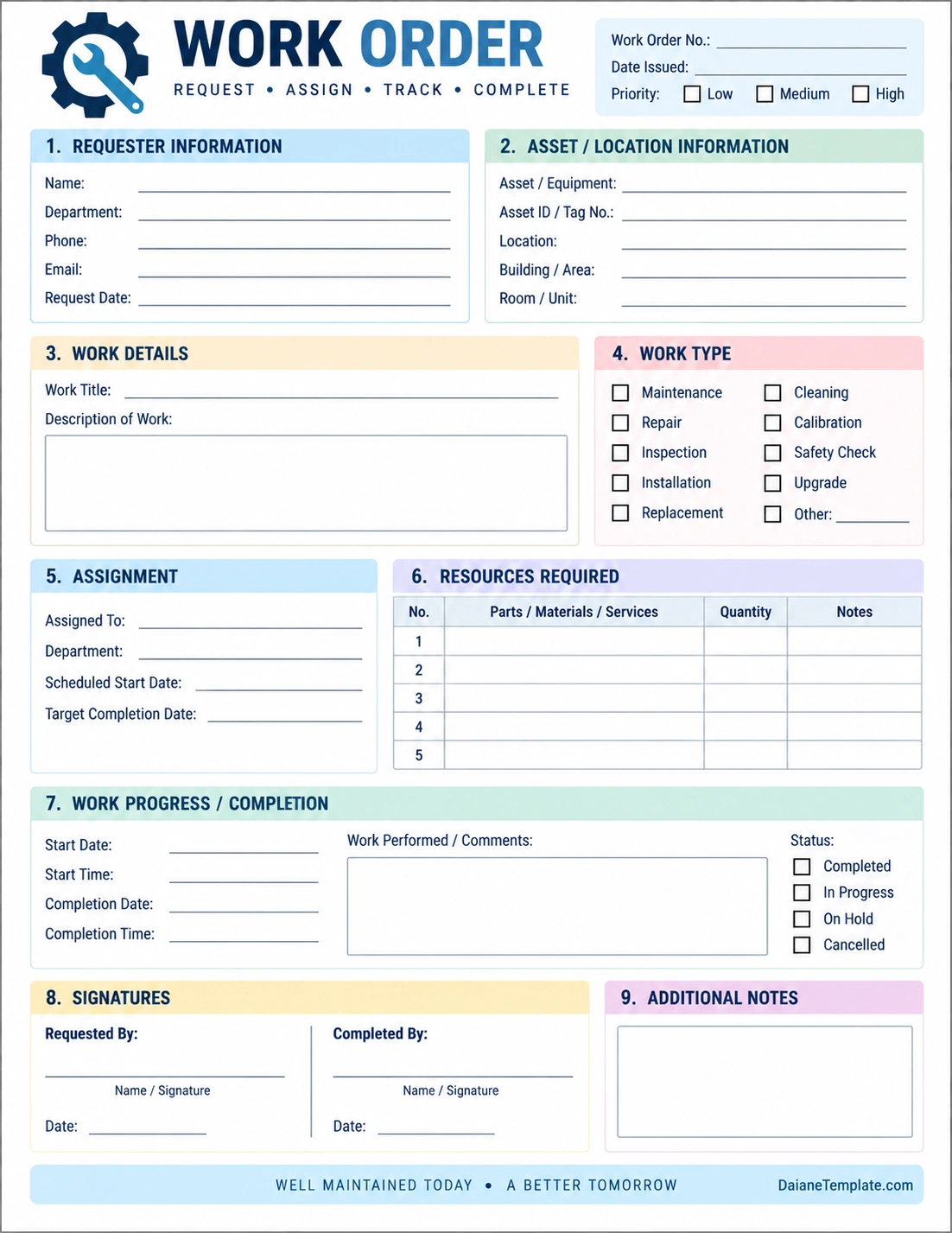
A practical printable form can include sections for requester information, asset and location details, work description, work type, assignment, required resources, scheduling, progress, completion status, signatures, and additional notes.
The template shown above is designed around this workflow. It provides a structured space for documenting a job from the initial request through completion while keeping the information organized on a single printable page.
Digital vs. Printable Work Orders
Organizations can manage work orders using paper forms, spreadsheets, dedicated maintenance software, or other digital systems. Each approach can be useful depending on the size and complexity of the operation.
A printable work order can be appropriate for smaller operations or situations where employees work directly with physical equipment and need a form that can be carried to the job site.
Digital work orders can provide additional capabilities such as centralized storage, automated notifications, search functions, reporting, status updates, and easier access to historical records.
Regardless of the format, the underlying objective remains the same: create a reliable connection between a work request, the people responsible for it, the resources required, and the completed result.
Work Order Completion Checklist
Before closing a work order, review the following items:
- The correct work order number is recorded.
- The requester and location information is complete.
- The asset or equipment is correctly identified.
- The work performed is documented.
- Parts and materials used are recorded when applicable.
- Important problems or findings are documented.
- The completion date and time are recorded when required.
- The final status is selected.
- Required approvals or signatures are completed.
- Additional follow-up work is identified if necessary.
Conclusion
A work order provides a structured way to turn a service request into a clearly defined, assigned, scheduled, and trackable job. Whether it is used for maintenance, repairs, inspections, installations, or internal service requests, the document creates a central record for everyone involved.
By including clear work descriptions, asset information, assignments, required resources, schedules, completion details, and notes, a work order can improve communication and accountability while creating useful historical records.
A well-designed work order template makes the process easier by giving employees and managers a consistent format for documenting each job. When work orders are completed accurately and reviewed consistently, the resulting information can support better scheduling, resource planning, maintenance management, and long-term operational improvement.
Download: Work Order Template

- Coaching Contract Agreement Template - November 5, 2026
- Cleaning Service Agreement Template - November 5, 2026
- Commercial Cleaning Agreement Template - November 5, 2026
