A catering menu does more than list food and beverage options. It introduces your catering business, communicates your style, and helps potential customers choose the right dining experience for their event. A well-organized menu makes it easier to compare dishes, understand pricing, and plan meals that suit different tastes and budgets.
Whether you cater weddings, corporate meetings, birthday parties, or private dinners, your menu plays an important role in attracting customers. It can highlight your signature dishes, explain available packages, and show clients how your services fit their event requirements.
Creating an effective catering menu starts with understanding your audience, choosing suitable dishes, and presenting your offerings clearly. This guide explains what to include, how to organize menu categories, how to set prices, and how to use a catering menu template to create a professional presentation.
What Is a Catering Menu?
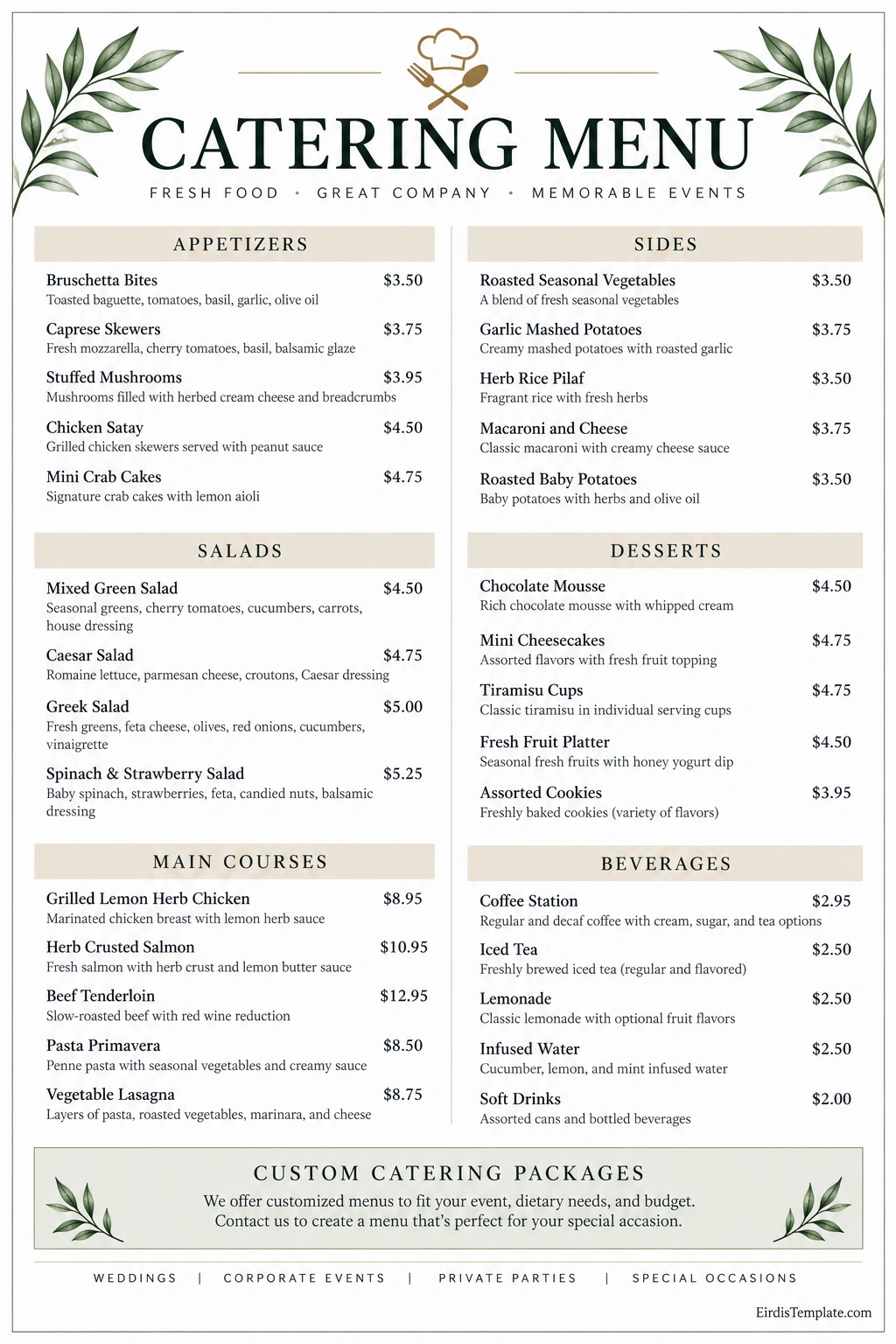
A catering menu is a document that presents the food, beverages, packages, and related services a catering business offers for events. It helps customers understand their options before requesting a quote or booking a service.
Depending on the business, a menu may feature appetizers, salads, main courses, side dishes, desserts, beverages, and complete meal packages. It may also include per-person prices, minimum order quantities, serving sizes, and notes about dietary accommodations.
A catering menu can be designed for a specific event or used as a general overview of a caterer’s services. Some businesses create separate menus for weddings, corporate events, private parties, and seasonal celebrations.
Why Is a Professional Catering Menu Important?
A clear and attractive menu helps customers understand what you offer and decide whether your services meet their needs. It also supports your marketing efforts by presenting your food, pricing, and brand consistently.
1. Sets the Tone for the Event
Food is an important part of the guest experience. A formal wedding may call for a plated dinner with several courses, while a casual gathering may suit a buffet, grazing table, or selection of finger foods.
Your catering menu should reflect the atmosphere and service style you want to provide. The dishes, descriptions, and overall design can communicate whether your business specializes in elegant celebrations, relaxed gatherings, or professional corporate events.
2. Helps Customers Make Decisions
Customers often compare several catering providers before choosing one. A menu that clearly groups dishes, explains ingredients, and displays pricing where appropriate makes that comparison easier.
Useful descriptions help customers understand portion styles, preparation methods, and available alternatives without needing to ask questions about every item.
3. Promotes Your Catering Brand
Your menu is a practical marketing tool. Consistent colors, typography, photography, and writing style can reinforce your brand identity and make your business easier to recognize.
Highlighting signature dishes, seasonal specialties, and customizable packages can also help communicate what distinguishes your catering service from competitors.
4. Supports Budget Planning
When pricing is presented clearly, customers can compare packages and estimate costs before making a booking. This can reduce confusion about per-person rates, service fees, and optional extras.
If final prices depend on the guest count, location, or menu selections, explain that customers can request a tailored quote.
What Should a Catering Menu Include?
The contents of your catering menu depend on your business model and the types of events you serve. However, several elements can make a menu more informative and useful.
1. Business Name and Contact Information
Display your catering business name prominently. Include a website, email address, telephone number, or another suitable contact method so prospective customers can request information or book your services.
A short introduction can explain your specialty, service area, or approach to food preparation.
2. Appetizers and Starters
Appetizers are useful for receptions, cocktail hours, networking events, and gatherings where guests eat before the main meal. Depending on your service style, options may include bruschetta, vegetable platters, stuffed mushrooms, skewers, or bite-sized pastries.
Consider offering a balance of vegetarian, meat-based, and lighter choices. Make serving sizes clear when customers need to estimate quantities for a group.
3. Salads and Light Meals
Salads can complement a main course or serve as a lighter meal option. Popular choices include mixed greens, Caesar salad, Greek salad, grain bowls, and seasonal vegetable combinations.
Describe key ingredients and identify dressings or toppings that may contain common allergens. Where possible, offer suitable alternatives for customers with dietary requirements.
4. Main Courses
Main courses often form the centerpiece of a catered meal. Depending on your audience, you might offer chicken, fish, beef, pasta, or plant-based dishes.
Include a concise description of each dish and explain any important preparation details. A varied selection helps customers build menus that accommodate different preferences and budgets.
5. Side Dishes
Side dishes complete the meal and allow customers to customize their selections. Common options include roasted vegetables, potatoes, rice, pasta, and seasonal salads.
Organize sides separately from main courses so customers can compare options quickly. If a package includes a specific number of sides, state that clearly.
6. Desserts
Desserts add a finishing touch to weddings, celebrations, and corporate events. Your menu might include mini cheesecakes, cookies, brownies, fruit platters, pastries, or individual dessert cups.
Consider offering different portion sizes and options for guests with specific dietary needs. Clearly identify available alternatives rather than assuming a dessert is suitable for everyone.
7. Beverages
List available drinks separately, including water, coffee, tea, juices, lemonade, and other beverages you provide. If beverage service includes staff, equipment, or refills, explain those details in the relevant package description.
Where applicable, distinguish between beverages included in the package and items that incur an additional charge.
8. Catering Packages and Optional Services
Packages simplify the selection process for customers who prefer a complete solution. For example, you might offer a buffet package, a formal dinner package, or a light refreshment package for meetings.
Explain what each package includes, such as the number of courses, food quantities, serving equipment, delivery, and staffing. List optional upgrades separately so customers understand how their choices affect the final quote.
How to Create a Catering Menu Step by Step
A successful catering menu combines appealing food choices with practical planning. Follow these steps to create a menu that is easy to understand and suitable for your business.
Step 1: Identify Your Target Customers
Consider the events you want to serve and the customers most likely to book your services. Wedding clients may prioritize presentation and customized menus, while corporate customers may value convenience, dietary variety, and reliable delivery.
Understanding your audience helps you choose suitable dishes, portion sizes, service styles, and pricing structures.
Step 2: Choose a Manageable Selection of Dishes
Offer enough variety to meet different preferences without making your operation unnecessarily complicated. Consider ingredient availability, preparation time, storage requirements, staffing, and equipment capacity.
A focused menu can help maintain consistent quality and make purchasing and food preparation more efficient.
Step 3: Write Clear Food Descriptions
Use short, specific descriptions that help customers understand each dish. Mention the main ingredients, preparation style, and notable accompaniments where relevant.
Avoid vague descriptions that provide little information. At the same time, keep the wording concise enough for customers to scan the menu quickly.
Step 4: Set Your Prices Carefully
Calculate food costs, labor, packaging, transportation, equipment, and other operating expenses before establishing prices. Consider the service level and portion size associated with each item.
Decide whether to display individual prices, per-person rates, package prices, or custom-quote options. If taxes, delivery fees, or staffing charges are additional, explain this clearly.
Step 5: Address Dietary Requirements
Customers may need vegetarian, vegan, gluten-free, dairy-free, or other dietary options. Identify which alternatives your business can reliably provide and explain how customers should communicate their needs.
Be accurate when describing allergens and food preparation practices. Never promise that a dish is allergen-free unless your processes can support that claim.
Step 6: Organize the Menu for Easy Reading
Group similar dishes under clear headings. Use consistent formatting for item names, descriptions, and prices, and place the most relevant information where customers can find it quickly.
For a printed menu, check that the text remains readable at its final size. For a digital menu, make sure the layout works on mobile devices as well as desktop screens.
Step 7: Review and Update Regularly
Check the menu for spelling errors, outdated prices, unavailable ingredients, and incorrect contact details. Review customer feedback and adjust offerings when demand, costs, or seasonal availability changes.
Keep older versions organized so your team can identify which menu and prices apply to each event or booking.
How to Price a Catering Menu
Pricing should cover your costs while remaining appropriate for your market and service level. A simple pricing process can help you make informed decisions.
Calculate the Full Cost
Include the cost of ingredients, preparation labor, kitchen overhead, packaging, transportation, equipment, and other expenses associated with delivering the service.
For staffed events, consider the number of workers required, setup time, service duration, and cleanup responsibilities.
Choose a Pricing Method
Common approaches include per-person pricing, individual item pricing, fixed packages, and customized quotes. Each method serves a different purpose, so choose one that suits the complexity of your services.
Per-person pricing can simplify budgeting for large events, while custom quotes may be more suitable for specialized menus or unusual venue requirements.
Explain What the Price Covers
Make it clear whether the quoted price includes delivery, setup, serving staff, tableware, taxes, and cleanup. If the final amount depends on guest numbers or other variables, explain how adjustments are calculated.
Design Tips for a Professional Catering Menu
A professional design makes your menu easier to navigate and helps customers understand your brand. Focus on clarity first, then add visual elements that support the experience you want to communicate.
- Use clear headings: Separate appetizers, main courses, sides, desserts, and beverages.
- Choose readable fonts: Avoid overly decorative typefaces for descriptions and prices.
- Maintain consistent spacing: Give each category and item enough room to be read comfortably.
- Use a coordinated color palette: Select colors that reflect your brand and maintain good contrast.
- Highlight signature dishes: Draw attention to specialties without overcrowding the page.
- Use relevant images selectively: Choose accurate, high-quality food images when they genuinely help customers understand the offering.
- Include clear contact details: Make it easy for prospective clients to ask questions or request a quote.
- Check print and digital versions: Ensure that the layout remains clear on paper and on smaller screens.
Catering Menu Template: How to Use One
A catering menu template provides a starting structure for presenting your food and beverage offerings. It can include categories, dish descriptions, prices, package details, and business contact information.
Choose a template that suits your service style. A formal wedding menu may benefit from a refined layout, while a corporate lunch menu may work better with a compact design that makes package details easy to compare.
Replace sample dishes and prices with accurate information from your business. Confirm that every listed item is available, descriptions reflect the actual ingredients, and prices match your current offerings.
Before publishing, review the menu for readability, spelling, contact details, dietary information, and any terms customers need to know. Save a print-ready version and an editable copy so future updates are easier to manage.
Frequently Asked Questions About Catering Menus
What is the purpose of a catering menu?
A catering menu presents available food, beverages, packages, and pricing information. It helps customers choose suitable options for an event and allows the catering business to communicate its style and services.
What should a catering menu include?
A catering menu commonly includes appetizers, salads, main courses, side dishes, desserts, beverages, and packages. It should also identify the business and provide contact information, with prices and dietary details where appropriate.
How many dishes should a catering menu have?
There is no universal number. The right selection depends on your business capacity, target customers, event types, and service style. Aim for enough variety to meet customer needs while keeping preparation and quality manageable.
Should a catering menu display prices?
Displaying prices can help customers compare options and estimate costs. If prices vary by guest count, location, or customization, you can show starting prices or explain that a tailored quote is available.
How do I make a catering menu attractive?
Use clear categories, readable typography, concise descriptions, consistent spacing, and colors that suit your brand. Highlight signature dishes and keep the layout organized so customers can find information quickly.
Can I use a catering menu template for different events?
Yes. You can adapt a general template for weddings, corporate meetings, birthdays, private parties, and other occasions. Adjust the dishes, packages, descriptions, and pricing to suit each event.
How often should I update my catering menu?
Review your menu whenever ingredient costs, seasonal availability, service packages, or business details change. Regular reviews help keep the information accurate and prevent customers from choosing unavailable items.
Conclusion
A catering menu is both a practical planning document and an important marketing tool. It helps customers explore food options, compare prices, understand available services, and choose a menu that suits their event.
Start by identifying your audience, selecting manageable dishes, writing clear descriptions, and establishing prices that reflect your costs. Then organize the information into readable categories and make sure dietary details, package terms, and contact information are accurate.
With a well-designed catering menu template, you can present your offerings professionally, strengthen your brand identity, and make it easier for prospective customers to plan their next event with your catering business.
Download: Catering Menu Template

- Certificate of Accomplishment Template - October 19, 2026
- Cease and Desist Letter Template - October 19, 2026
- Catholic Wedding Program Template - October 19, 2026
