A certificate of achievement is a meaningful way to recognize someone’s hard work, progress, and accomplishments. It can be used in schools, workplaces, sports organizations, training programs, and community events to celebrate success and encourage continued growth. With a well-designed certificate of achievement template, you can create a professional award without starting from scratch.
Whether you want to reward a student for academic progress, recognize an employee for outstanding performance, or celebrate a team member’s contribution, a printable achievement certificate makes the recognition more personal. This guide explains what to include, how to choose a suitable design, and how to customize a certificate for different occasions.
What Is a Certificate of Achievement?
A certificate of achievement is a document presented to an individual or group to acknowledge a specific accomplishment, skill, contribution, or milestone. Unlike a general participation certificate, an achievement certificate usually highlights something the recipient has accomplished or demonstrated.
Organizations can use this type of award to recognize both major milestones and smaller successes. For example, a teacher may recognize a student’s improvement in reading, while a manager may celebrate an employee who completes an important project.
A certificate of achievement can be used to:
- Recognize academic performance and learning progress.
- Celebrate professional accomplishments and workplace contributions.
- Acknowledge sports performance, teamwork, or personal improvement.
- Reward completion of a training course or development program.
- Encourage positive behavior, dedication, and consistent effort.
- Commemorate achievements in clubs, community groups, and volunteer programs.
Free Printable Certificate of Achievement Template
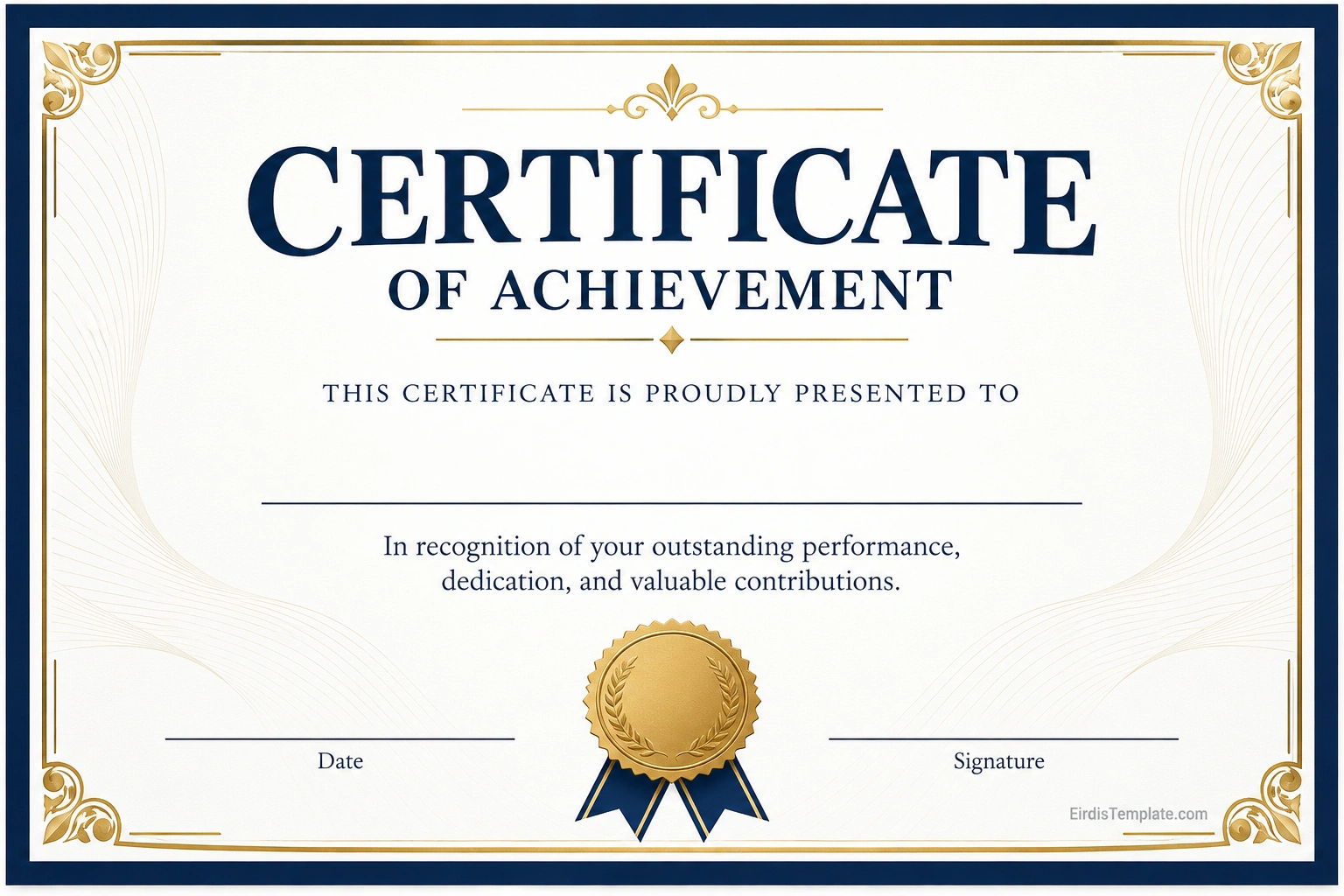
A free printable certificate of achievement template provides a simple starting point for creating a personalized award. You can add the recipient’s name, describe the accomplishment, include the presentation date, and provide a signature from the person or organization presenting the certificate.
Choose a layout that matches the occasion. A formal award may benefit from an elegant border and classic typography, while a certificate for younger students may use brighter colors and a more playful design. For business or professional recognition, a clean and balanced layout often works best.
What to Include on a Certificate of Achievement
A good achievement certificate should communicate the accomplishment clearly while looking polished and easy to read. The exact wording may vary depending on the recipient and occasion, but most certificates include several essential elements.
1. Certificate Title
Use a clear heading such as “Certificate of Achievement,” “Outstanding Achievement Award,” or “Certificate of Excellence.” The title should make the purpose of the award immediately understandable.
2. Recipient’s Full Name
The recipient’s name is one of the most important parts of the certificate. Make it prominent and double-check the spelling before printing. If the certificate recognizes a team or organization, use the appropriate group name instead.
3. Description of the Achievement
Explain why the certificate is being presented. Specific wording makes the award more meaningful than a generic statement. For example, you might recognize academic improvement, exceptional customer service, leadership, creativity, teamwork, or successful completion of a course.
4. Name of the Presenting Organization
Include the name of the school, company, sports club, training provider, or organization issuing the certificate. A logo may also be added if you have permission to use it and the design has enough space.
5. Date and Signature
Add the date the certificate is presented. A signature line for a teacher, manager, coach, program director, or other authorized person can make the award feel more official. Include the signer’s printed name and title when appropriate.
6. Decorative Elements
A border, seal, ribbon, or subtle accent color can improve the presentation. Keep decorative details balanced so that the recipient’s name and the achievement statement remain the main focus.
How to Make a Certificate of Achievement
Creating a professional certificate is straightforward when you plan the content before choosing the final design. Follow these steps to prepare an award that is ready to print or share digitally.
Step 1: Define the Purpose of the Award
Decide what accomplishment you want to recognize and who will receive the certificate. A classroom award, employee recognition certificate, and sports achievement award may need different wording and visual styles.
Step 2: Choose a Suitable Template
Select a certificate of achievement template that fits the occasion. Formal borders and restrained colors work well for professional settings, while friendly illustrations and brighter accents may suit children or informal activities.
Step 3: Write a Specific Award Statement
Use a short statement that explains the achievement. For example, “In recognition of outstanding academic progress and dedication to learning.” If the award is for a completed program, state the program name and completion date when relevant.
Step 4: Personalize the Certificate
Enter the recipient’s name, achievement description, issuing organization, date, and signature details. Check spacing and font sizes so that all information remains legible and visually balanced.
Step 5: Review and Print
Proofread the completed certificate before printing. Use a high-quality printer setting and choose paper that suits the purpose. Standard US Letter paper measuring 8.5 by 11 inches is a practical option for many printable certificates. Landscape orientation is often suitable for award layouts, although portrait designs can work as well.
For a more polished result, consider using heavier paper or cardstock if your printer supports it. Print one test copy first to check margins, colors, and text alignment.
Types of Certificates of Achievement
The wording and design of an achievement certificate should reflect the accomplishment being recognized. Here are common examples for different settings.
Academic Certificate of Achievement
Schools and educational programs can use academic achievement certificates to recognize strong performance, improvement, subject-specific progress, reading milestones, or dedication to learning. The award statement should describe the student’s achievement in clear, encouraging language.
Employee Certificate of Achievement
Businesses can present employee achievement certificates for outstanding performance, successful project delivery, customer service, leadership, innovation, or reaching a significant goal. Adding the employee’s department or project name can make the recognition more specific.
Sports Certificate of Achievement
Sports clubs and athletic programs can use achievement certificates to recognize individual performance, teamwork, personal improvement, discipline, or completion of a training season. The design may include subtle sports-related accents when appropriate.
Training and Course Completion Certificate
Training providers may issue certificates to recognize successful completion of a workshop, course, or development program. Be precise about whether the document recognizes achievement, attendance, or completion, since these terms communicate different things.
Personal and Community Achievement Certificate
Community groups, clubs, and volunteer organizations can recognize service, commitment, leadership, or contributions to a shared project. A personalized statement helps explain why the recipient’s effort matters to the group.
Tips for Designing a Professional Achievement Certificate
A certificate does not need an elaborate design to feel special. A clear layout, thoughtful wording, and quality printing can make a simple award memorable.
- Keep the message focused: Highlight one main accomplishment instead of filling the certificate with lengthy text.
- Use readable fonts: Choose decorative typography for the title and a simple font for supporting details.
- Create a clear hierarchy: Make the certificate title and recipient’s name stand out.
- Choose appropriate colors: Use a restrained palette for formal awards or a more colorful style for informal recognition.
- Leave enough white space: Avoid overcrowding the page with borders, icons, and text.
- Check print settings: Confirm paper size, orientation, scaling, and margins before printing multiple copies.
- Personalize the wording: Name the accomplishment so the recipient understands exactly what is being recognized.
Certificate of Achievement vs. Certificate of Completion
A certificate of achievement and a certificate of completion may look similar, but they communicate different things. A certificate of achievement recognizes a specific accomplishment, level of performance, skill, or milestone. A certificate of completion confirms that someone has finished a course, program, or required activity.
For example, a student who demonstrates exceptional improvement in mathematics may receive a certificate of achievement. A student who finishes a six-week mathematics course may receive a certificate of completion. Some programs may issue both, depending on their criteria.
Choose the title that accurately describes the reason for the award. Clear wording helps recipients, employers, schools, and other readers understand what the certificate represents.
Common Mistakes to Avoid
Before distributing an award, review the certificate for mistakes that could make it look unprofessional or misrepresent the achievement.
- Misspelling the recipient’s name.
- Using vague wording that does not explain the accomplishment.
- Choosing text that is too small to read when printed.
- Adding too many decorative elements that distract from the message.
- Leaving out the date or issuing organization when those details are relevant.
- Using a completion certificate when the purpose is to recognize a specific achievement, or vice versa.
- Printing without checking margins and page orientation.
A quick review by another person can help catch spelling errors and layout problems before the certificate is presented.
Frequently Asked Questions
What is the purpose of a certificate of achievement?
A certificate of achievement recognizes an individual’s accomplishment, effort, skill, or progress. Schools, businesses, sports organizations, and community groups use it to celebrate success and encourage continued development.
Can I create my own certificate of achievement?
Yes. You can use a printable certificate of achievement template and personalize it with the recipient’s name, award statement, organization, date, and signature. Choose a design that suits the occasion and review the details before printing.
What should I write on a certificate of achievement?
Include a clear title, the recipient’s name, a specific description of the accomplishment, the issuing organization, the presentation date, and an authorized signature when appropriate. Keep the wording concise and positive.
What size should a printable achievement certificate be?
US Letter paper, measuring 8.5 by 11 inches, is a common choice for printable certificates in the United States. Landscape orientation is often used for award designs, but the best orientation depends on the template.
Can a certificate of achievement be used at work?
Yes. Employers can use achievement certificates to recognize project success, outstanding performance, leadership, teamwork, professional development, and other meaningful contributions.
Is a certificate of achievement the same as a diploma?
No. A certificate of achievement generally recognizes a particular accomplishment or milestone. A diploma usually documents completion of a formal educational program or qualification. The meaning and recognition of each document depend on the issuing institution and context.
Should a certificate of achievement be signed?
A signature is not always required, but it can add credibility and a personal touch. For school, workplace, or organizational awards, consider including the signature and title of the person authorized to present the certificate.
Can I send a certificate of achievement digitally?
Yes. You can save a completed certificate as a PDF or another suitable digital format and send it by email or through a learning or workplace platform. Check that the text remains readable and the document displays correctly on screen and when printed.
Conclusion
A certificate of achievement is a simple but meaningful way to celebrate progress, dedication, and success. By choosing an appropriate template and including a clear award statement, recipient name, date, and signature, you can create a professional certificate for educational, workplace, sports, or community use.
Use a printable certificate of achievement template to save time and maintain a consistent design. Personalize the wording, check every detail, and select paper and print settings that suit the occasion. A thoughtful certificate can make an accomplishment feel recognized and give the recipient a lasting reminder of their success.
Download: Certificate of Achievement Template

- Certificate of Employment Template - October 21, 2026
- Certificate of Destruction Template - October 21, 2026
- Certificate of Completion Template - October 21, 2026
