A billing invoice is an essential business document used to request payment for goods or services provided to a customer. It records what was sold, how much the customer owes, the payment deadline, and the terms of the transaction. A clear invoice helps businesses maintain accurate financial records, communicate payment expectations, and manage their accounts receivable more effectively.
Whether you are a freelancer, small business owner, consultant, or service provider, using a consistent billing invoice template can simplify your invoicing process. Instead of creating every invoice from scratch, you can use a structured format to record customer information, itemized charges, taxes, payment terms, and the total amount due.
In this guide, you will learn what a billing invoice is, which details it should include, how to prepare one step by step, and how to use an invoice template to create professional billing documents.
What Is a Billing Invoice?
A billing invoice is a document issued by a seller or service provider to formally request payment from a buyer. It describes the products delivered or services performed and specifies the amount the customer must pay.
Depending on the business and transaction, an invoice may include an invoice number, issue date, payment due date, customer details, itemized charges, applicable taxes, discounts, and payment instructions.
For example, a graphic designer may send a billing invoice after completing a logo design project. The invoice can list the design services, agreed fee, any additional charges, and the date payment is due.
A billing invoice also creates a useful record of the transaction for both parties. When properly maintained, invoices can support bookkeeping, payment follow-ups, revenue tracking, and tax preparation. Specific invoicing and tax requirements vary by jurisdiction and transaction type.
What Is a Billing Invoice Template?
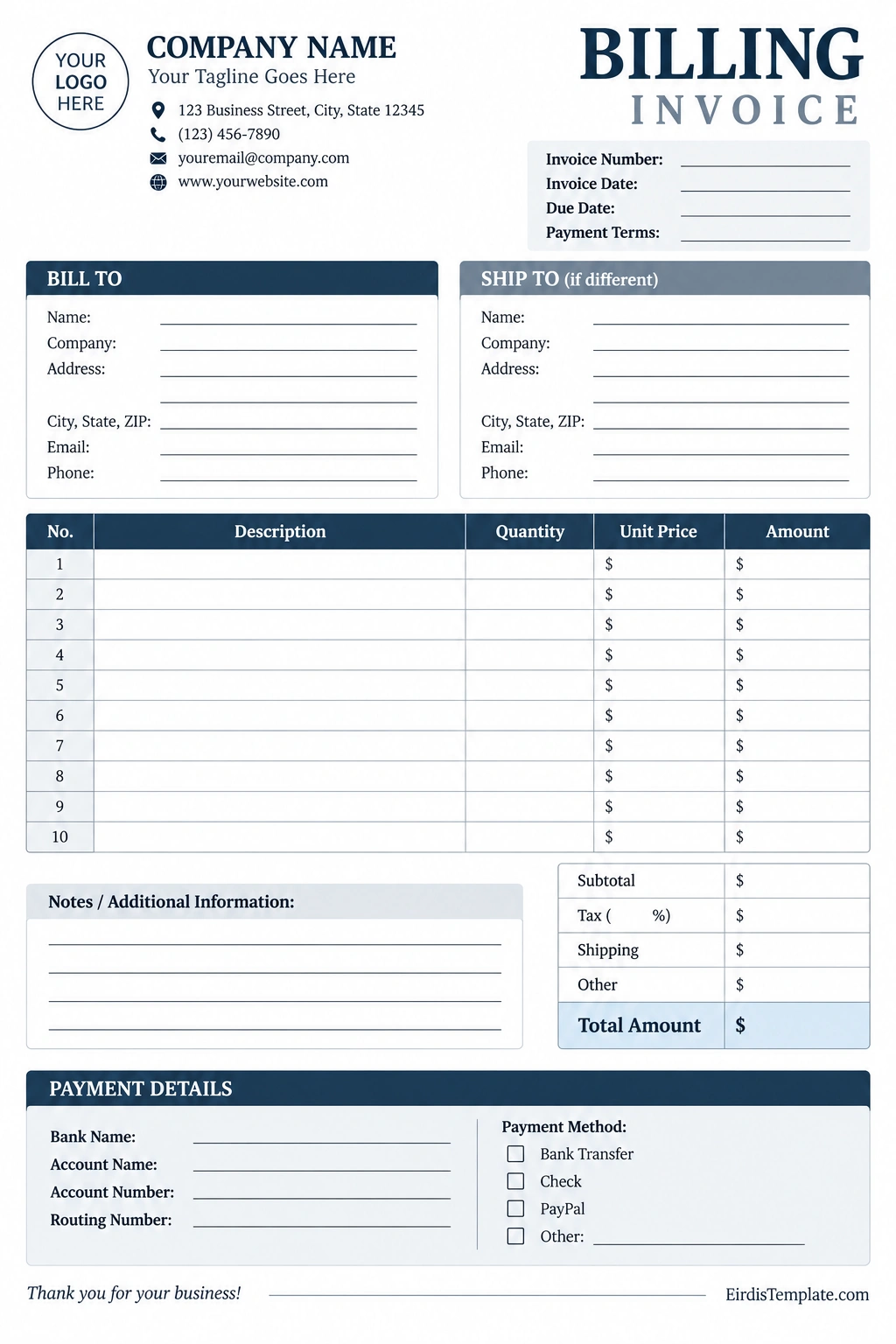
A billing invoice template is a reusable document designed to organize the information needed to bill a customer. It provides a consistent layout for seller details, customer information, invoice dates, descriptions, quantities, prices, totals, and payment instructions.
A printable billing invoice template is useful for businesses that prefer preparing documents by hand or using a simple word processor. Digital templates can also be edited in spreadsheet or document software, making it easier to duplicate invoices and maintain consistent formatting.
Using a standard template saves time, reduces the risk of overlooking important details, and gives customers a clearer explanation of what they are being charged for.
Why Is a Billing Invoice Important?
A well-prepared invoice does more than request payment. It helps businesses document transactions, communicate clearly with customers, and maintain an organized financial workflow.
1. Clearly Communicates Payment Expectations
An invoice tells customers what they are paying for, how much they owe, and when payment is expected. Clear descriptions and payment terms help reduce confusion and make it easier for customers to process their bills.
2. Creates an Official Transaction Record
Invoices provide a record of the goods or services billed to a customer. Businesses can use these documents to review sales, follow up on outstanding balances, and support bookkeeping activities.
3. Helps Manage Cash Flow
Sending accurate invoices promptly can help businesses collect payments more efficiently. Recording invoice dates, due dates, and payment status also makes it easier to identify overdue accounts and plan future expenses.
4. Supports Professional Business Relationships
A clean, consistent invoice communicates important information without requiring unnecessary clarification. Including a business name, contact details, clear descriptions, and payment instructions can help create a more professional customer experience.
5. Simplifies Bookkeeping
Organized invoices make it easier to match customer payments with the work or products billed. Sequential invoice numbers and consistent recordkeeping can also help businesses locate transactions when reviewing financial reports or preparing tax records.
What Information Should a Billing Invoice Include?
The exact requirements for an invoice depend on the transaction, industry, and applicable rules. However, most billing invoices benefit from the following essential sections.
Business and Seller Information
Include the seller’s legal or business name, address, email address, and other relevant contact details. A business logo may be added when appropriate, but it should not make the invoice difficult to read.
Depending on local requirements, the invoice may also need a business registration number, tax identification number, or other identifying information.
Customer Information
Identify the person or organization responsible for payment. Include the customer’s name or business name and the appropriate billing address or contact details.
For business-to-business transactions, confirm that the invoice is addressed to the correct legal entity or department to avoid processing delays.
Invoice Number and Dates
Assign a unique invoice number to help identify the document. Include the invoice issue date and payment due date so both parties can track the transaction.
A consistent numbering system makes invoices easier to organize and reduces the risk of confusing one transaction with another.
Description of Goods or Services
List each product or service separately whenever practical. Use descriptions that help the customer understand what was supplied and why the charge applies.
For example, a freelance consultant might list project planning, research, and final report preparation as separate service items. A retailer might list product names, quantities, and unit prices.
Quantities, Rates, and Amounts
For each item, record the quantity, unit price or rate, and line total. Check the arithmetic carefully before issuing the invoice.
If you charge by the hour, include the number of hours and the hourly rate. If you sell physical products, record the quantity and price per unit.
Subtotal, Taxes, Discounts, and Total
Show the subtotal before applicable adjustments, then list taxes, shipping fees, discounts, or other charges when relevant. Clearly highlight the final amount due.
Apply taxes and other charges according to the rules that govern the transaction. Do not add a tax merely because the template includes a tax field.
Payment Terms and Instructions
Explain when payment is due and how the customer can pay. Depending on your business, acceptable methods may include bank transfer, check, an approved online payment service, or another agreed method.
If you use payment terms such as Net 15 or Net 30, make sure the meaning and due date are clear to the customer. Include any applicable late-payment terms only when they are permitted and have been properly communicated.
How to Create a Billing Invoice Step by Step
Creating a billing invoice becomes easier when you follow the same process for every transaction. Use these steps to prepare an accurate and professional document.
Step 1: Choose an Invoice Template
Select a billing invoice template that suits the type of transaction. A simple service invoice may need only a few line items, while a product invoice may require more space for quantities, shipping, and taxes.
Make sure the template has enough room for customer details, invoice dates, payment terms, and the final amount due.
Step 2: Add Seller and Customer Details
Enter the correct business information and identify the customer who is responsible for payment. Verify names, addresses, and any required identification details before continuing.
Step 3: Assign a Unique Invoice Number
Give the invoice a unique identifier using your established numbering system. For example, a business might use a format such as INV-2026-001. This is only an example; choose a system that fits your recordkeeping process.
Avoid reusing invoice numbers, and keep a record of issued invoices, including those that are later voided or corrected.
Step 4: List Products or Services
Describe the goods delivered or services completed. Enter quantities, rates, and line totals, and make sure the descriptions agree with the underlying order, agreement, or work completed.
Step 5: Calculate the Amount Due
Add the line items to calculate the subtotal. Apply relevant discounts, taxes, shipping charges, or other agreed adjustments, then verify the final total.
Double-check the arithmetic and currency before sending the document. If you use a spreadsheet or invoicing application, review the formulas rather than assuming every calculation is correct.
Step 6: Set the Payment Due Date
Enter the agreed payment terms and the corresponding due date. Make sure the deadline is consistent with your contract, purchase order, or other arrangement with the customer.
Step 7: Include Payment Instructions
Explain how the customer should submit payment and provide the necessary payment details through an appropriate, secure channel. Check that the instructions are current and easy to follow.
Step 8: Review and Send the Invoice
Before sending the invoice, verify the customer information, invoice number, dates, descriptions, totals, and payment instructions. Save a copy for your records and send the invoice using the agreed delivery method.
Track the invoice until payment is received, and follow up professionally if the due date passes without payment.
Tips for Managing Billing Invoices Effectively
A consistent invoicing process can help reduce administrative work and improve the accuracy of your financial records.
- Invoice promptly: Send invoices according to your agreement rather than allowing completed work to remain unbilled.
- Use consistent numbering: Maintain a clear system for identifying each invoice.
- Keep descriptions specific: Explain what was supplied instead of using vague labels such as “services.”
- Confirm payment terms: Agree on deadlines and charges before work begins whenever possible.
- Maintain an invoice register: Track invoice numbers, customer names, issue dates, due dates, amounts, and payment status.
- Follow up on overdue invoices: Send courteous reminders and keep a record of relevant communications.
- Store documents securely: Keep invoices and supporting records organized and accessible to authorized users.
- Review outstanding balances: Regularly identify unpaid invoices and investigate discrepancies.
Common Billing Invoice Mistakes to Avoid
Small invoicing errors can delay payment or create confusion for customers. Review each invoice carefully to avoid these common problems.
- Incorrect customer details: An invoice sent to the wrong person or business may be rejected or delayed.
- Duplicate invoice numbers: Reusing an identifier can complicate payment tracking and bookkeeping.
- Missing due dates: Customers may be uncertain about when payment is expected.
- Vague item descriptions: Unclear charges can lead to questions or disputes.
- Incorrect calculations: Errors in quantities, rates, taxes, or totals can affect the amount collected.
- Unclear payment instructions: Missing or outdated instructions may make it harder for customers to pay.
- Inconsistent records: Failing to update payment status can cause unnecessary reminders or inaccurate reports.
- Ignoring local requirements: An invoice format that works for one transaction may not meet the legal or tax requirements of another.
Billing Invoice vs. Receipt
A billing invoice and a receipt serve different purposes, even though both are important transaction records.
- Billing invoice: Requests payment for goods or services and states the amount due.
- Receipt: Confirms that a payment has been received.
- Purchase order: Records a buyer’s request or authorization to purchase specified goods or services.
- Credit note: Documents an adjustment that reduces an amount previously invoiced, when appropriate.
An invoice does not automatically prove that payment has been received. Once the customer pays, record the payment and issue a receipt when required or appropriate for your business.
Frequently Asked Questions About Billing Invoices
What is the main purpose of a billing invoice?
The main purpose of a billing invoice is to formally request payment for goods or services provided. It identifies the transaction, explains the charges, states the amount due, and communicates payment terms.
What should a billing invoice include?
A billing invoice generally includes seller and customer details, a unique invoice number, issue and due dates, descriptions of goods or services, quantities, rates, subtotal, applicable taxes or adjustments, total amount due, and payment instructions. Additional details may be required depending on local regulations.
When should a billing invoice be sent?
Send an invoice according to the payment terms agreed with the customer. Depending on the arrangement, this may be after goods are delivered, after services are completed, at an agreed project milestone, or according to a recurring billing schedule.
Is a billing invoice the same as a receipt?
No. An invoice requests payment, while a receipt confirms that payment has been received. A business may issue both documents at different stages of the same transaction.
Can I use a printable billing invoice template?
Yes. A printable billing invoice template is suitable for preparing invoices by hand or using a document editor. You can customize it with business details, itemized charges, due dates, payment terms, and other information relevant to your transaction.
Does every billing invoice need an invoice number?
A unique invoice number is a widely used best practice because it helps identify and track transactions. Specific legal requirements vary by location and transaction type, so check the rules applicable to your business.
How do I track unpaid billing invoices?
Maintain an invoice register containing the invoice number, customer, issue date, due date, total amount, and payment status. Review outstanding invoices regularly, record partial or full payments accurately, and follow up on overdue balances.
Conclusion
A billing invoice is an important document for requesting payment, documenting business transactions, and maintaining organized financial records. When an invoice clearly identifies the customer, describes the goods or services, and states the correct amount and payment deadline, it helps both parties understand their responsibilities.
Using a billing invoice template makes the process more consistent and reduces the time needed to prepare each document. By checking calculations, maintaining unique invoice numbers, tracking payment status, and keeping secure records, you can build a more reliable invoicing workflow.
Choose a template that fits your business, customize it with the required details, and review each invoice before sending it. A clear and consistent invoicing process can support better bookkeeping, more efficient payment follow-ups, and stronger customer communication.
Download: Billing Invoice Template

- Free Printable Blank Check Template - October 9, 2026
- Birth Certificate Template - October 9, 2026
- Free Customizable Biography Template - October 9, 2026
