Keeping track of monthly bills can be challenging when payment dates, expenses, and income come from different sources. A missed due date may lead to late fees, service interruptions, or unnecessary financial stress. A bill organizer helps you manage these responsibilities by keeping your bills, payment deadlines, and payment status in one convenient place.
Whether you manage household expenses, rent, utilities, subscriptions, insurance premiums, or loan payments, a bill payment organizer can help you build a more consistent financial routine. By recording upcoming obligations and reviewing your expenses regularly, you can make informed decisions about spending and prepare for payments before they become urgent.
In this guide, you will learn what a bill organizer is, which details to track, how to create a monthly bill payment schedule, and how to use a printable bill organizer template to stay organized throughout the year.
What Is a Bill Organizer?
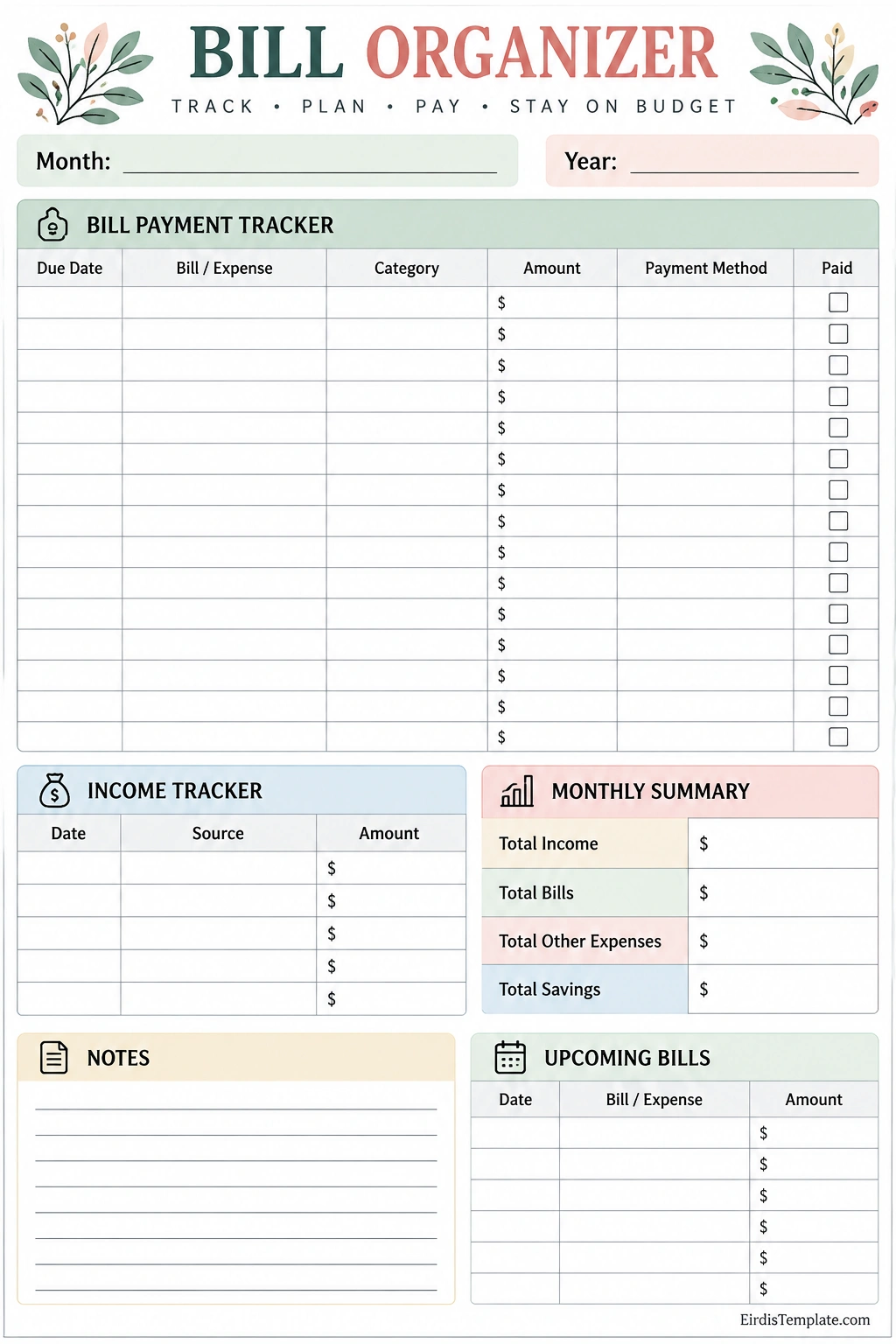
A bill organizer is a worksheet, planner, spreadsheet, or digital tool used to record and manage recurring and one-time bills. It helps you monitor payment amounts, due dates, payment methods, and whether each bill has been paid.
Instead of relying on memory, scattered reminders, or individual billing statements, you can use a centralized bill tracking system to see your financial obligations at a glance. Many organizers also include sections for income, additional expenses, savings, and monthly totals.
A printable bill organizer is especially useful for people who prefer writing information by hand or keeping a physical household budget binder. Digital versions can provide additional features, such as automatic calculations, calendar reminders, and searchable records.
Why Use a Bill Organizer?
A bill organizer provides a simple structure for managing everyday financial responsibilities. It can help you develop better payment habits without requiring complicated budgeting software.
1. Avoid Missed Payment Deadlines
Recording every bill’s due date makes it easier to see which payments need attention. You can review upcoming deadlines at the beginning of each week and schedule reminders before payments are due.
Consistent tracking can reduce the risk of late fees and missed payments. However, a worksheet alone does not send automatic alerts, so consider pairing a printable organizer with calendar notifications or reminders from your billing providers.
2. Understand Monthly Expenses
A bill payment tracker helps you see how much money is committed to regular obligations. Common examples include rent or mortgage payments, electricity, water, internet, phone service, insurance, and loan installments.
When you understand your recurring expenses, you can estimate how much income remains for groceries, transportation, personal spending, and savings.
3. Improve Budgeting Habits
Bill tracking supports a more realistic monthly budget because it shows when payments are due and how much they cost. This information helps you plan spending around fixed obligations instead of treating every dollar in your account as available.
4. Reduce Financial Stress
Uncertainty about unpaid bills can make money management feel overwhelming. A centralized organizer provides a clear record of what has been paid, what remains outstanding, and which deadlines are approaching.
Having this information in one place can make routine financial reviews faster and more manageable.
5. Support Household Financial Planning
Families and shared households can use a bill organizer to coordinate payment responsibilities. Recording the bill, due date, amount, and responsible person helps prevent confusion when more than one person contributes to household expenses.
What Should a Bill Organizer Include?
A useful bill organizer contains the information you need to monitor obligations and plan payments. You can customize the sections according to your household’s financial situation.
Bill Name and Expense Category
List each bill under a recognizable name and assign a category. Examples include housing, utilities, insurance, transportation, subscriptions, education, and debt payments.
Consistent categories make it easier to identify where your money goes and compare expenses from one month to another.
Due Date
Record the date each payment is due. If a bill has a different due date every month, check the latest statement rather than assuming the date will remain the same.
You can also record the date you intend to make the payment. Scheduling payments a few days early may provide a useful buffer for processing delays, weekends, or holidays.
Amount Due
Enter the expected payment amount and update it when the actual bill arrives. Fixed expenses, such as some insurance premiums, may stay relatively consistent, while electricity, water, and other usage-based bills can vary.
For variable expenses, comparing the estimated amount with the final bill can help you improve future budget planning.
Payment Status
Use a checkbox or status label to identify whether a bill is unpaid, scheduled, or paid. Mark a bill as paid only after you have confirmed the transaction or payment arrangement.
For important payments, you may also record the payment date or confirmation reference. Avoid placing sensitive account information on a worksheet that could be seen by other people.
Payment Method
Record the general method used to pay each bill, such as bank transfer, debit card, direct debit, check, or an authorized payment portal. This can help you remember how a payment was made when reviewing your records.
Do not write full card numbers, passwords, security codes, or online banking credentials on a printable bill tracker.
Income and Monthly Summary
Some bill organizers include an income tracker and a monthly summary. These sections help you compare money received with bills and other expenses.
You can calculate total income, total bills, other expenses, and savings to get a clearer picture of your monthly cash flow. Keep these categories separate to avoid counting the same expense twice.
How to Use a Printable Bill Organizer Template
A printable bill organizer template can be used at the start of each month and updated whenever a new bill arrives or a payment is made. Follow these steps to create a reliable routine.
Step 1: Gather Your Bills
Collect your latest statements, invoices, subscription details, loan schedules, and other payment information. Check each source for the amount due, payment deadline, and any changes to the billing arrangement.
Include recurring obligations as well as irregular expenses that you know are coming, such as annual insurance premiums or registration fees.
Step 2: List Every Payment
Enter each bill on your organizer. Include the bill name, category, due date, expected amount, and payment method when useful.
Review bank statements or previous bills to identify recurring payments that may be easy to forget. Include subscriptions and automatic withdrawals even when you do not need to make a manual payment each month.
Step 3: Arrange Bills by Due Date
Sort payments chronologically so the earliest deadlines appear first. If your worksheet does not have a dedicated date-sorting feature, write the dates in order or highlight the most urgent payments.
This simple step helps you prioritize payments and see when several bills are due close together.
Step 4: Compare Bills With Available Income
Review your expected income and the amount needed for upcoming obligations. Make sure you account for essential living expenses and other planned spending before deciding how much money is available for discretionary purchases or savings.
If your income varies, use a conservative estimate and review the organizer whenever your actual income changes.
Step 5: Schedule and Make Payments
Choose an appropriate time to pay each bill. You might pay bills as soon as the funds are available, schedule payments in advance, or set a weekly payment review.
Confirm that the selected payment method is active and that sufficient funds are available. For automatic payments, periodically verify that the amount and withdrawal date are still correct.
Step 6: Update Payment Status
After completing a payment, mark the bill as paid and record the payment date if needed. For scheduled transactions, confirm that the payment has actually been processed before treating the obligation as settled.
If a payment fails or a bill changes, update the record promptly and contact the provider when necessary.
Step 7: Review the Month
At the end of the month, total your bills and compare actual expenses with your budget. Note any unexpected charges, price increases, missed payments, or subscriptions you no longer need.
Use these observations to prepare a more accurate organizer for the next month.
Tips for Organizing Monthly Bills More Effectively
Small improvements to your bill management routine can make the process easier to maintain over time.
- Choose one central location: Keep all current bills in one binder, folder, spreadsheet, or digital system.
- Set recurring reminders: Use a calendar or reminder app to review bills before their due dates.
- Track automatic payments: Include direct debits and subscriptions so they remain visible in your budget.
- Keep a payment buffer: When possible, allow time for processing delays and ensure funds are available before scheduled withdrawals.
- Review variable bills: Compare utility bills and other changing expenses with previous months.
- Separate essential and optional expenses: This can help you identify areas where spending may be adjusted.
- Store supporting records securely: Keep statements and payment confirmations in a secure location.
- Update the organizer regularly: Add new bills, revise changed amounts, and remove obligations that have ended.
Bill Organizer vs. Budget Planner
A bill organizer and a budget planner support financial management, but they focus on different tasks.
- Bill organizer: Focuses on payment deadlines, amounts due, payment methods, and payment status.
- Budget planner: Focuses on allocating income across expenses, savings goals, and spending categories.
- Expense tracker: Records money spent so you can review actual spending patterns.
- Debt payment tracker: Monitors balances, required payments, interest, and progress toward paying off debt.
These tools work well together. A bill organizer helps you manage when obligations must be paid, while a budget planner helps you decide how your available income should be allocated.
Common Bill Management Mistakes to Avoid
Even a detailed bill tracker may not help if important information is inaccurate or the organizer is rarely updated. Avoid these common mistakes.
- Forgetting annual bills: Add irregular obligations to your calendar before they become due.
- Relying only on memory: Record new bills and changed due dates as soon as you learn about them.
- Ignoring small subscriptions: Several small recurring payments can add up over time.
- Assuming automatic payments always succeed: Check your statements and payment confirmations periodically.
- Using outdated amounts: Update variable bills when the latest statement arrives.
- Marking payments too early: Distinguish between scheduled, processing, and completed payments.
- Mixing bill tracking with confidential data: Keep account credentials and sensitive payment details out of a shared worksheet.
Frequently Asked Questions About Bill Organizers
What is the purpose of a bill organizer?
A bill organizer helps you record bills, payment amounts, due dates, and payment status in one place. It makes financial obligations easier to review and can reduce the risk of missed deadlines and late fees.
What bills should I include in my bill organizer?
Include recurring and occasional obligations such as rent or mortgage payments, electricity, water, internet, phone service, insurance, loan installments, credit card payments, subscriptions, tuition, and annual fees. Only include obligations that apply to your situation.
How often should I update my bill payment tracker?
Update your bill tracker whenever you receive a new statement, learn about a changed due date, or complete a payment. Reviewing it weekly and preparing a fresh copy at the beginning of each month can help keep the information accurate.
Can a printable bill organizer help prevent late fees?
Yes. A printable bill organizer makes upcoming due dates and unpaid bills visible, helping you plan payments in advance. For better protection, combine it with calendar alerts and payment confirmations because the worksheet itself does not automatically send reminders.
What is the difference between a bill organizer and an expense tracker?
A bill organizer focuses on obligations that need to be paid, including their due dates and payment status. An expense tracker records money already spent. Using both can help you plan future payments and understand actual spending.
Should I include income in my bill organizer?
Including income can be useful because it helps you compare available money with upcoming bills. If your organizer includes an income tracker and monthly summary, use them to estimate cash flow while keeping savings and other expenses clearly categorized.
Is a digital or printable bill organizer better?
The best option depends on your preferences. A printable organizer provides a simple paper record, while a digital version may offer automatic calculations, searchable entries, and reminders. You can combine both methods by using a printed monthly tracker and digital calendar alerts.
Conclusion
A bill organizer is a practical tool for tracking payment deadlines, monitoring recurring expenses, and maintaining a clearer view of your monthly financial commitments. By recording each bill, checking due dates, and updating payment status consistently, you can build a more reliable bill management routine.
A printable bill organizer template gives you a simple starting point for organizing bills, income, and upcoming payments without complicated software. Use it alongside a realistic budget, regular reminders, and secure financial records to stay informed about your obligations.
Start by listing your current bills, arranging them by due date, and reviewing the organizer every week. With consistent habits, you can make bill management more organized and approach your monthly finances with greater confidence.
Download: Bill Organizer Template

- Free Printable Blank Check Template - October 9, 2026
- Birth Certificate Template - October 9, 2026
- Free Customizable Biography Template - October 9, 2026
