Business hours tell customers when a company is open, when they can visit, and when they can expect assistance. A clear business hours schedule helps customers plan their visits, make phone calls, and arrange appointments. It also helps businesses organize staffing, manage daily operations, and deliver more reliable customer service.
Whether you operate a retail store, office, restaurant, salon, clinic, or online business, communicating your opening and closing times is essential. Customers may become frustrated when they arrive at a closed location or contact a business outside its stated service hours. Clear and accurate information helps prevent these problems.
A business hours template makes it easier to display a weekly schedule in a professional, easy-to-read format. You can use it on a storefront, website, social media page, reception desk, or customer information board. This guide explains what business hours mean, how to create a useful schedule, and how to communicate opening times effectively.
What Are Business Hours?
Business hours are the times when a company is normally open for customers or available to provide services. They identify the days and hours when people can visit a physical location, contact a team, or access a particular service.
Business hours vary according to the type of organization, customer needs, location, and operating model. A professional office may operate from 9:00 AM to 5:00 PM on weekdays, while a restaurant may remain open into the evening. A retail store may also offer weekend hours to accommodate shoppers.
Business hours can refer to public opening times, telephone support hours, appointment availability, or the working hours of a specific department. These schedules may differ, so businesses should clearly explain which service each schedule covers.
Why Are Business Hours Important?
Publishing accurate business hours benefits both customers and the people responsible for running the business. A consistent schedule reduces uncertainty and helps everyone plan their time more effectively.
- Improves customer convenience: Customers can plan visits and contact the business when assistance is available.
- Sets clear expectations: Opening and closing times explain when customers can expect in-person or telephone service.
- Supports staff scheduling: Managers can coordinate employee shifts with expected customer demand.
- Reduces missed visits and calls: Accurate information helps customers avoid arriving when the business is closed.
- Strengthens customer trust: Consistent schedules show that the business communicates clearly and professionally.
- Improves operational efficiency: Teams can organize deliveries, appointments, maintenance, and administrative tasks around operating hours.
- Supports online visibility: Consistent opening hours across websites and business listings help customers find reliable information.
Business hours should reflect actual operations. If a schedule changes temporarily or permanently, update the information wherever customers may see it.
Business Hours Example and Printable Schedule
A business hours example helps demonstrate how to present a weekly schedule clearly. A printable business hours sign can display each day alongside its opening and closing times, allowing customers to check availability at a glance.
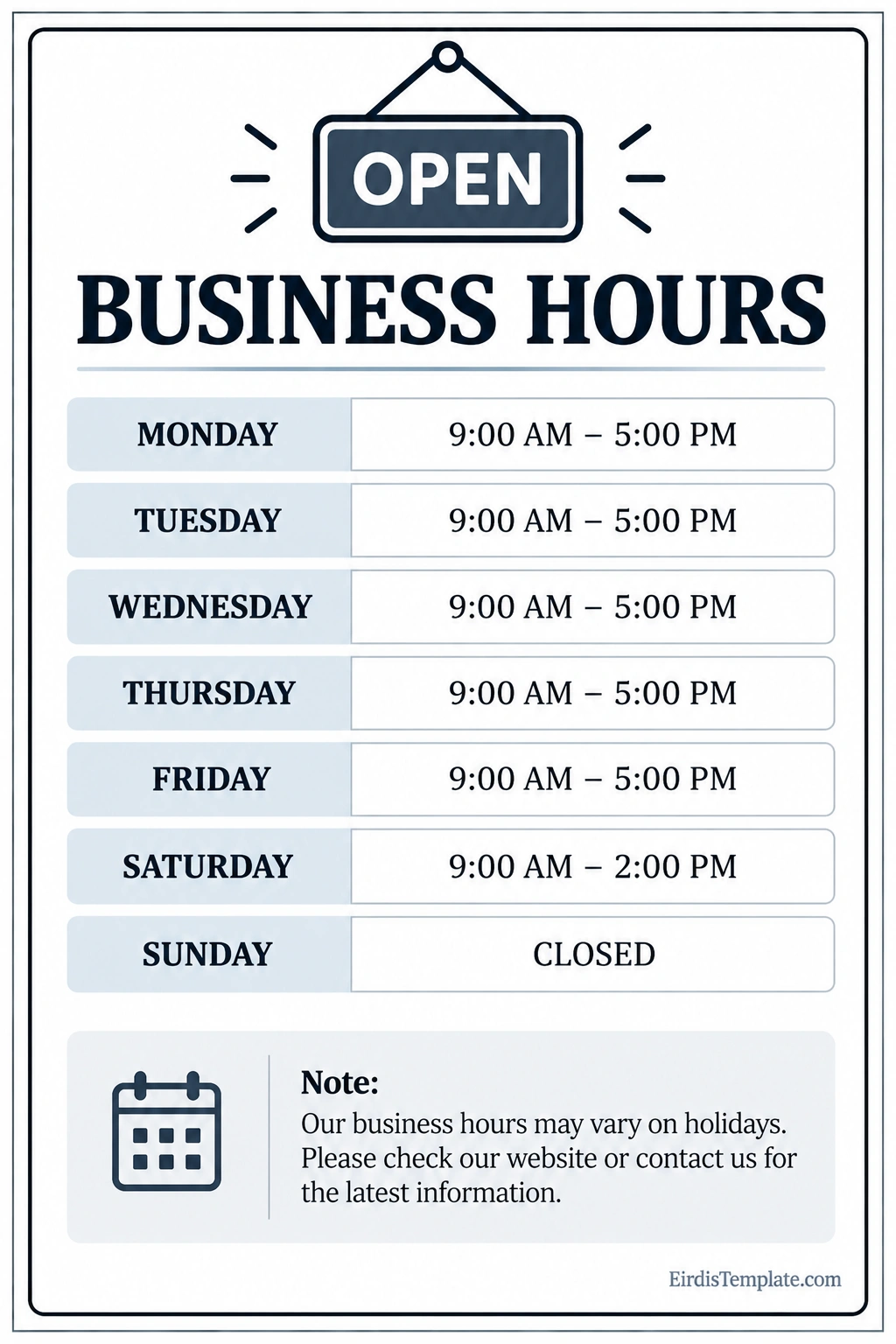
The sample schedule shows a business open from 9:00 AM to 5:00 PM Monday through Friday, from 9:00 AM to 2:00 PM on Saturday, and closed on Sunday. It also includes a note explaining that holiday hours may vary.
These times are illustrative rather than universal. Replace them with your actual schedule before displaying the sign. You can adapt the design for a store entrance, office reception area, service counter, or other customer-facing location.
A professional business hours sign should use readable text, consistent time formatting, and a simple layout. If customers need to make appointments or contact a separate support team, include the relevant contact details or direct them to the correct information source.
What Should a Business Hours Schedule Include?
A useful business hours schedule provides enough information for customers to understand when and how they can access a service. The details depend on the business, but several elements are commonly helpful.
Business Name
Display the business name clearly so customers know which location or organization the schedule belongs to. If the company operates multiple branches, include the location name or address when necessary.
Days of Operation
List each day of the week, including days when the business is closed. Avoid leaving a day blank because customers may not know whether the omission is intentional or an oversight.
Opening and Closing Times
Use a consistent format, such as 9:00 AM–5:00 PM. Make sure the times match the actual operating schedule. If the business closes temporarily during the day, explain the break rather than showing misleading continuous hours.
Special or Holiday Hours
Some businesses operate on reduced hours during public holidays, seasonal periods, or special events. Add a short notice explaining where customers can confirm the latest schedule.
Contact Information
Consider including a telephone number, website, or other suitable contact method. Customers can use these details to confirm availability, ask questions, or arrange appointments.
Service-Specific Availability
Some organizations open their premises at one time but provide certain services during different hours. For example, customer support, delivery, consultations, and appointment bookings may each follow a separate schedule. Label these hours clearly to avoid confusion.
Common Business Hours Examples
Different industries require different operating schedules. The following examples illustrate how business hours can be structured according to customer needs and daily operations.
Retail Store Business Hours
A retail store may open during the day and remain open later in the evening to accommodate customers after work. Weekend hours may be longer or shorter depending on shopping patterns and staffing needs.
Example: Monday–Friday, 9:00 AM–6:00 PM; Saturday, 10:00 AM–4:00 PM; Sunday, closed.
Office Business Hours
Professional offices often operate during standard weekday working hours. Some provide appointments outside those times, but such arrangements should be communicated separately.
Example: Monday–Friday, 8:30 AM–5:00 PM; Saturday–Sunday, closed.
Restaurant Business Hours
Restaurants may open for breakfast, lunch, dinner, or several meal periods. Their public opening times should reflect when customers can actually order or receive service.
Example: Monday–Thursday, 11:00 AM–9:00 PM; Friday–Saturday, 11:00 AM–10:00 PM; Sunday, 12:00 PM–8:00 PM.
Salon and Appointment-Based Business Hours
Salons, repair shops, consultants, and other appointment-based businesses may use published operating hours while requiring customers to book certain services in advance. Make the distinction between open hours and appointment availability clear.
Example: Tuesday–Saturday, 9:00 AM–6:00 PM; Sunday–Monday, closed. Appointments are recommended.
Customer Support Business Hours
Customer support teams may follow a schedule that differs from the company’s physical location. A business should state the support team’s time zone, operating days, and available contact methods when customers may be located in different regions.
Example: Monday–Friday, 8:00 AM–6:00 PM Eastern Time, excluding listed holidays.
Always verify these examples against your actual operating requirements. The right schedule is the one your business can consistently maintain.
How to Create a Business Hours Schedule
Creating a clear business hours schedule begins with deciding when customers need access to your business and when your team can reliably provide service. Follow these steps to develop a practical schedule.
- Step 1: Identify customer needs. Consider when customers typically visit, call, place orders, or request assistance.
- Step 2: Review staffing availability. Confirm that enough employees are available to cover the proposed operating hours.
- Step 3: Set regular operating times. Choose opening and closing times that fit your service model and resources.
- Step 4: Define breaks and appointment rules. Explain lunch closures, scheduled consultations, or other periods when regular service is unavailable.
- Step 5: Plan for holidays. Decide how public holidays, seasonal periods, and special events may affect the schedule.
- Step 6: Choose a display format. Use a printable sign, website table, business listing, or other format that customers can read easily.
- Step 7: Check the details. Verify every day, time, time zone, and closure notice before publishing.
- Step 8: Publish the schedule consistently. Use the same regular hours across your website, social media profiles, printed signs, and relevant business listings.
- Step 9: Assign responsibility for updates. Make sure someone is responsible for correcting outdated information.
- Step 10: Review the schedule periodically. Adjust operating times when customer demand, staffing, or business requirements change.
Tips for Displaying Business Hours Effectively
Even an accurate schedule can be difficult to use if the information is poorly presented. These practical tips help customers find and understand your opening times quickly.
- Use readable typography: Choose clear text with enough contrast against the background.
- Keep the layout simple: Arrange days and times in consistent rows or columns.
- Use consistent time notation: Avoid mixing formats such as 9 AM, 09:00, and 9:00 PM without a clear reason.
- Make closures obvious: Write “Closed” instead of leaving the day blank.
- Include holiday guidance: Tell customers where to find updated hours during special periods.
- Place signs where customers can see them: A storefront entrance or reception area is often a useful location.
- Update online listings: Check your website and relevant business profiles whenever hours change.
- Clarify time zones: Online services and support teams should state the applicable time zone when it may affect customers.
- Distinguish opening hours from service availability: Explain if deliveries, appointments, or telephone support follow different schedules.
Common Business Hours Mistakes to Avoid
Small inconsistencies can lead to missed visits, unnecessary calls, and frustrated customers. Avoid these common mistakes when publishing your schedule.
- Displaying outdated hours: Review every location where your schedule appears after a change.
- Forgetting holiday closures: Publish special hours early enough for customers to plan ahead.
- Using unclear wording: State exact opening and closing times rather than phrases such as “open during the day.”
- Ignoring different locations: Confirm whether branches operate on the same schedule before using a company-wide sign.
- Confusing support and storefront hours: Label different service schedules separately.
- Publishing hours the business cannot maintain: Coordinate the schedule with staffing and operational capacity.
- Omitting the time zone online: Make the relevant time zone clear for customers in other regions.
Frequently Asked Questions About Business Hours
What does business hours mean?
Business hours are the times when a company is normally open to customers or available to provide a particular service. They may refer to physical opening hours, telephone support, appointments, or department availability.
What are standard business hours?
A common example is Monday through Friday, 9:00 AM to 5:00 PM. However, there is no single schedule that applies to every business. Retail stores, restaurants, healthcare providers, and online services may use different hours.
How should I display business hours?
List each day alongside its opening and closing times, mark closed days clearly, and add a note for holiday changes when appropriate. Use readable formatting and display the schedule on your storefront and online channels.
What is the difference between business hours and working hours?
Business hours generally describe when a company is open or available to customers. Working hours refer to the time employees work or are scheduled to work. The two may overlap, but they are not necessarily identical.
Should business hours include lunch breaks?
If a lunch break affects customer access, show the closure or explain the service interruption. If employees take staggered breaks and the business remains fully open, a separate lunch notice may not be necessary.
How often should business hours be updated?
Update the schedule whenever regular hours change, and publish temporary changes before they take effect whenever possible. Review online listings and printed materials to ensure customers receive consistent information.
Can business hours differ by location?
Yes. Different branches may have different opening times because of local demand, staffing, regulations, or the services offered. Publish location-specific schedules so customers can check the correct information.
Conclusion
Business hours help customers understand when they can visit a company, contact its team, or access a service. A clear schedule improves convenience, supports staff planning, and helps businesses communicate more reliably.
Use a business hours sign or printable schedule to display your regular opening times, closed days, and holiday notices. Keep the information consistent across your storefront, website, and online listings. By reviewing and updating your schedule regularly, you can reduce confusion and create a better customer experience.
Download: Business Hours Template

- Free Printable Call Sheet Template - October 12, 2026
- Free Printable Business Hours Template - October 12, 2026
- Business Expense Template - October 12, 2026
