A timesheet with work description is a practical tool for recording the amount of time employees or contractors spend working on specific tasks, projects, or activities. Unlike a basic timesheet that only records start and end times, this type of timesheet connects working hours with a clear description of what was actually completed.
This additional detail can make time tracking much more useful for businesses. Managers can see where working hours are being spent, employees can document their contributions, and organizations can use the information for payroll, client billing, project costing, workload planning, and performance analysis.
For project-based businesses, a detailed timesheet can also provide valuable insight into how much effort different activities require. Over time, these records can help identify inefficient processes, improve resource allocation, and support more accurate project estimates.
What Is a Timesheet With Work Description?
A timesheet with work description is a time-tracking document that combines hours worked with information about the tasks performed during those hours.
A traditional timesheet may simply record that an employee worked eight hours on a particular day. A timesheet with a work description provides additional context by explaining how those eight hours were used.
For example, instead of recording only “8 hours,” an employee might document:
- 2 hours researching customer requirements.
- 3 hours developing project materials.
- 1 hour attending a project meeting.
- 1.5 hours revising documents.
- 0.5 hours responding to project-related emails.
This creates a clearer connection between time spent and work performed.
Why Use a Timesheet With Work Description?
Detailed time tracking can provide information that a basic attendance record cannot. By connecting working hours to specific tasks, businesses can better understand how resources are being used.
A detailed timesheet can help with:
- Payroll processing: Record hours worked for accurate wage calculations.
- Client billing: Document billable hours and the services performed.
- Project costing: Understand how much labor is being used on a project.
- Resource allocation: Identify where employees are spending the most time.
- Project planning: Use historical time data to estimate future work.
- Performance analysis: Review how time is distributed across activities.
- Process improvement: Identify repetitive or inefficient tasks.
- Accountability: Create a documented record of work performed.
The usefulness of the information depends on how consistently and accurately employees record their time and activities.
What Information Should a Timesheet With Work Description Include?
The exact layout can vary depending on the business and purpose of the timesheet. However, a useful template generally contains several important fields.
Employee Information
Start with basic information that identifies the person completing the timesheet.
- Employee name
- Employee ID, if applicable
- Department or team
- Job title
- Supervisor or manager
- Pay period
Date and Day
Each work entry should be associated with a specific date. Including the day of the week can make weekly timesheets easier to review.
Project or Client
If employees work on multiple projects or client accounts, include a project, job, or client field. This allows managers to identify how time is distributed across different work areas.
Work Description
The work description is the key feature that distinguishes this type of timesheet from a simple hours log. The description should briefly explain the actual work performed.
A useful description should answer questions such as:
- What task was completed?
- What project was it related to?
- What was the purpose of the activity?
- What deliverable or outcome resulted from the work?
Start and End Time
Many timesheets include start and end times for each activity. This provides a more detailed record of when work occurred.
Total Hours
The total hours field summarizes the amount of time spent on the activity or workday. Depending on the system, breaks may be recorded separately or deducted from the total.
Notes
A notes section can be useful for documenting additional information, such as delays, client meetings, dependencies, unexpected issues, or other circumstances affecting the work.
How to Fill Out a Timesheet With Work Description
Completing a detailed timesheet does not have to be complicated. A consistent process can make time tracking faster and more accurate.
1. Record Time Regularly
Enter time as close as possible to when the work occurs. Waiting until the end of the week can make it harder to remember exactly how time was spent.
2. Identify the Project
Select the appropriate project, client, department, or job code. This is especially important when the same employee works on several projects during a single day.
3. Describe the Work Clearly
Write a concise description of the task. Avoid descriptions that are too vague to provide useful information.
For example, “worked on project” does not provide much context. A more useful description might be “revised the project proposal based on client feedback and prepared the final draft for review.”
4. Enter the Time Spent
Record the start and end time or the total duration according to the company’s timesheet policy.
5. Review the Entry
Before submitting the timesheet, check that the dates, project names, work descriptions, and hours are accurate.
Examples of Work Descriptions for a Timesheet
The quality of a timesheet depends partly on the usefulness of its work descriptions. Descriptions should be specific enough to explain the activity without becoming unnecessarily long.
Administrative Work
- Processed incoming customer documents and updated the project records.
- Organized meeting notes and prepared the weekly administrative report.
- Reviewed and filed completed project documentation.
Marketing Work
- Researched keywords and prepared a content outline for the next campaign.
- Created social media copy and scheduled approved posts.
- Reviewed campaign performance data and prepared recommendations.
Design Work
- Created initial concepts for the new website homepage.
- Revised the presentation layout based on client feedback.
- Prepared final graphic assets for delivery.
Development Work
- Implemented the requested changes to the customer registration form.
- Tested the new application feature and corrected identified errors.
- Reviewed code and documented the completed development changes.
Consulting Work
- Reviewed operational data and identified potential process improvements.
- Conducted a client strategy meeting and documented action items.
- Prepared recommendations based on the project’s current performance.
Timesheet With Work Description for Payroll
One of the most common uses of a timesheet is documenting working hours for payroll. A detailed record can help an organization verify regular hours, overtime, and other time categories according to its applicable policies and requirements.
When used for payroll, consistency is particularly important. Employees should understand which hours need to be recorded, how breaks are handled, and when timesheets must be submitted.
Organizations should also ensure that their timekeeping practices comply with applicable employment and wage-and-hour requirements.
Timesheet With Work Description for Client Billing
For agencies, consultants, freelancers, attorneys, developers, and other professional service providers, detailed time records can support client billing.
A work description provides context for a billed time entry. Instead of presenting a client with a list of unexplained hours, the service provider can document the work associated with each entry.
For example:
- Project: Website Redesign
- Work Description: Revised homepage layout based on client feedback
- Time: 2.5 hours
Clear descriptions can make invoices easier to understand and may reduce questions about how billable time was used.
Timesheet With Work Description for Project Management
Time records can also provide valuable project management information. When project managers understand how much time different activities require, they can make better-informed decisions about schedules, staffing, and workload.
Historical timesheet data can help answer questions such as:
- Which tasks take longer than expected?
- Which projects require the most resources?
- Where are recurring delays occurring?
- Which activities consume significant amounts of employee time?
- Are project estimates realistic?
- Would additional resources improve project delivery?
Over time, this information can help organizations improve future project estimates and planning.
Benefits of Detailed Work Descriptions
Adding descriptions to time entries requires slightly more effort than recording hours alone, but the additional information can make the timesheet considerably more valuable.
Better Visibility
Managers can see not only how much time employees are working but also what activities are consuming that time.
More Accurate Project Costing
When hours are associated with specific projects and tasks, organizations can better understand the labor costs associated with their work.
Improved Resource Allocation
Detailed records can reveal where teams are spending substantial amounts of time and whether resources need to be redistributed.
Better Future Estimates
Historical data can provide a useful reference when estimating how long similar projects or tasks may take in the future.
Common Timesheet Mistakes to Avoid
Even a well-designed timesheet can produce poor data if entries are incomplete or inconsistent.
- Entering time from memory: Delayed entries can result in inaccurate records.
- Using vague descriptions: “Worked on project” does not explain what was accomplished.
- Combining unrelated tasks: Separate major activities when the distinction matters for billing or analysis.
- Forgetting non-project work: Meetings, administrative activities, and support tasks may also need to be recorded.
- Incorrect project codes: Assigning time to the wrong project can distort project costing.
- Rounding excessively: Follow the organization’s rules for recording time.
- Submitting without reviewing: A quick final review can catch missing or duplicated entries.
Tips for Creating an Effective Timesheet
A good timesheet with work description should be detailed enough to provide useful information while remaining simple enough that employees will actually use it consistently.
- Keep the layout clean and easy to scan.
- Use consistent project and task names.
- Provide enough space for meaningful work descriptions.
- Define how time should be recorded.
- Explain which activities are billable and non-billable when relevant.
- Set clear submission deadlines.
- Use the same format across similar teams or projects.
- Review time records periodically for patterns and inconsistencies.
- Avoid collecting unnecessary information that employees rarely use.
Using a Timesheet With Work Description Template
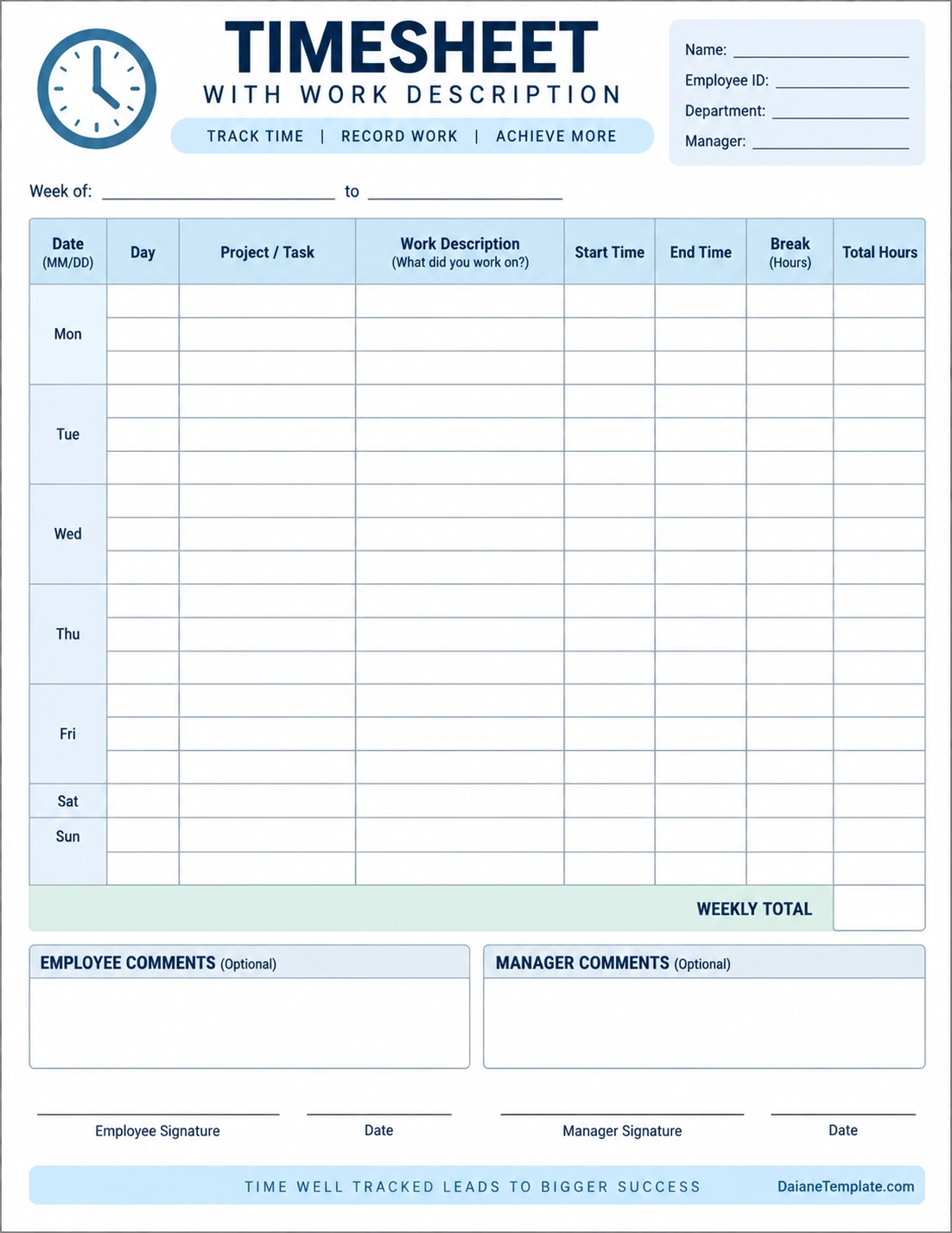
A timesheet with work description template provides a ready-made structure for documenting work hours and activities. A printable template can be particularly useful for employees who prefer completing their records manually or for organizations that need a simple paper-based process.
A practical template can include fields for the employee name, date, project, task or work description, start time, end time, break, total hours, and notes. A weekly format can also provide a summary of total hours at the end of the reporting period.
For digital workflows, the same structure can be recreated in a spreadsheet or time-tracking system. The important principle is to maintain a consistent connection between the time recorded and the work performed.
Timesheet Checklist
Before submitting a completed timesheet, use this quick checklist:
- Employee information is complete.
- Dates are correct.
- Projects or clients are identified correctly.
- Work descriptions clearly explain the activities performed.
- Start and end times are accurate.
- Breaks are recorded according to company policy.
- Total hours are calculated correctly.
- Billable and non-billable time is classified correctly when applicable.
- Important notes or exceptions are included.
- The timesheet has been reviewed before submission.
Conclusion
A timesheet with work description provides more than a record of attendance. By connecting working hours with specific tasks, projects, and outcomes, it gives businesses a clearer understanding of how time and resources are being used.
Whether the goal is payroll processing, client billing, project costing, resource planning, or performance analysis, detailed time records can provide useful information for better decision-making. The key is to keep entries accurate, descriptions specific, and the overall process simple enough to maintain consistently.
A well-designed timesheet with work description template can make this process easier by providing a structured place to record dates, projects, activities, hours, and notes. When used consistently, these records can become a valuable source of information for improving productivity, planning future work, and connecting employee effort to meaningful business outcomes.
Download: Timesheet Template With Work Description

- Free Student Resume Template (Word) - September 21, 2026
- Free Printable Travel Itinerary Template - September 21, 2026
- Free Printable Trip Schedule Template - September 21, 2026
