An attendance tracker is a practical tool for recording employee presence, absences, late arrivals, leave, and working time. Businesses use attendance tracking to maintain accurate work records, support payroll, monitor attendance patterns, and improve workforce management.
A well-organized attendance tracker can also reduce manual paperwork and make it easier to identify attendance issues. Whether you manage a small team, a department, or a larger workforce, a simple attendance tracking system provides a clear record of when employees are present and how their time is accounted for.
This guide explains what an attendance tracker is, what information it should contain, how to use one effectively, and how an attendance tracking template can simplify daily recordkeeping.
What Is an Attendance Tracker?
An attendance tracker is a document, spreadsheet, or digital tool used to record employee attendance over a specific period. It can track daily presence, absences, late arrivals, half days, overtime, and other attendance-related information.
Depending on the organization’s needs, an attendance tracker may be maintained daily, weekly, or monthly. A monthly attendance tracker is particularly useful because it provides a convenient overview of employee attendance throughout an entire pay or reporting period.
Common attendance codes may include:
- P: Present
- A: Absent
- L: Late
- H: Half day
- OT: Overtime
- Leave: Approved vacation, sick leave, or other authorized time off
Why Is an Attendance Tracker Important?
Accurate attendance records help organizations manage employees more efficiently. Instead of relying on memory or scattered notes, managers can use one consistent record to review attendance information.
Supports Accurate Payroll
Attendance records can help payroll teams verify the number of days or hours employees worked. When combined with approved leave and overtime records, an attendance tracker can provide useful information for calculating compensation.
It is important to remember that attendance tracking alone may not replace a formal timekeeping or payroll system when detailed work-hour records are legally required.
Helps Monitor Attendance Patterns
Regular tracking makes recurring patterns easier to identify. For example, a manager may notice frequent late arrivals, repeated absences, or unusually high overtime during certain periods.
Improves Workforce Planning
Attendance data can help managers understand staffing levels and identify periods when additional coverage may be necessary. This information can support scheduling, resource allocation, and workload planning.
Reduces Administrative Work
A structured attendance tracker reduces the need to maintain separate handwritten notes or multiple informal records. A digital attendance spreadsheet can also automate totals and reduce calculation errors.
Supports Company Policies
Consistent attendance records can help managers apply workplace attendance policies fairly. Employees and supervisors can refer to the same record when reviewing attendance history or discussing attendance-related concerns.
What Should an Attendance Tracker Include?
The information included in an attendance tracker depends on the organization and its tracking requirements. A simple employee attendance sheet may only need names and daily attendance codes, while a more detailed employee time tracking system may include working hours.
Useful fields can include:
- Employee name
- Employee identification number
- Department or team
- Month and year
- Daily attendance status
- Hours worked
- Late arrivals
- Absences
- Approved leave
- Overtime
- Total attendance days
- Notes or explanations
For a simple monthly attendance sheet, not every field is necessary. Choose the information that supports your organization’s actual attendance and reporting needs.
Attendance Tracker Template
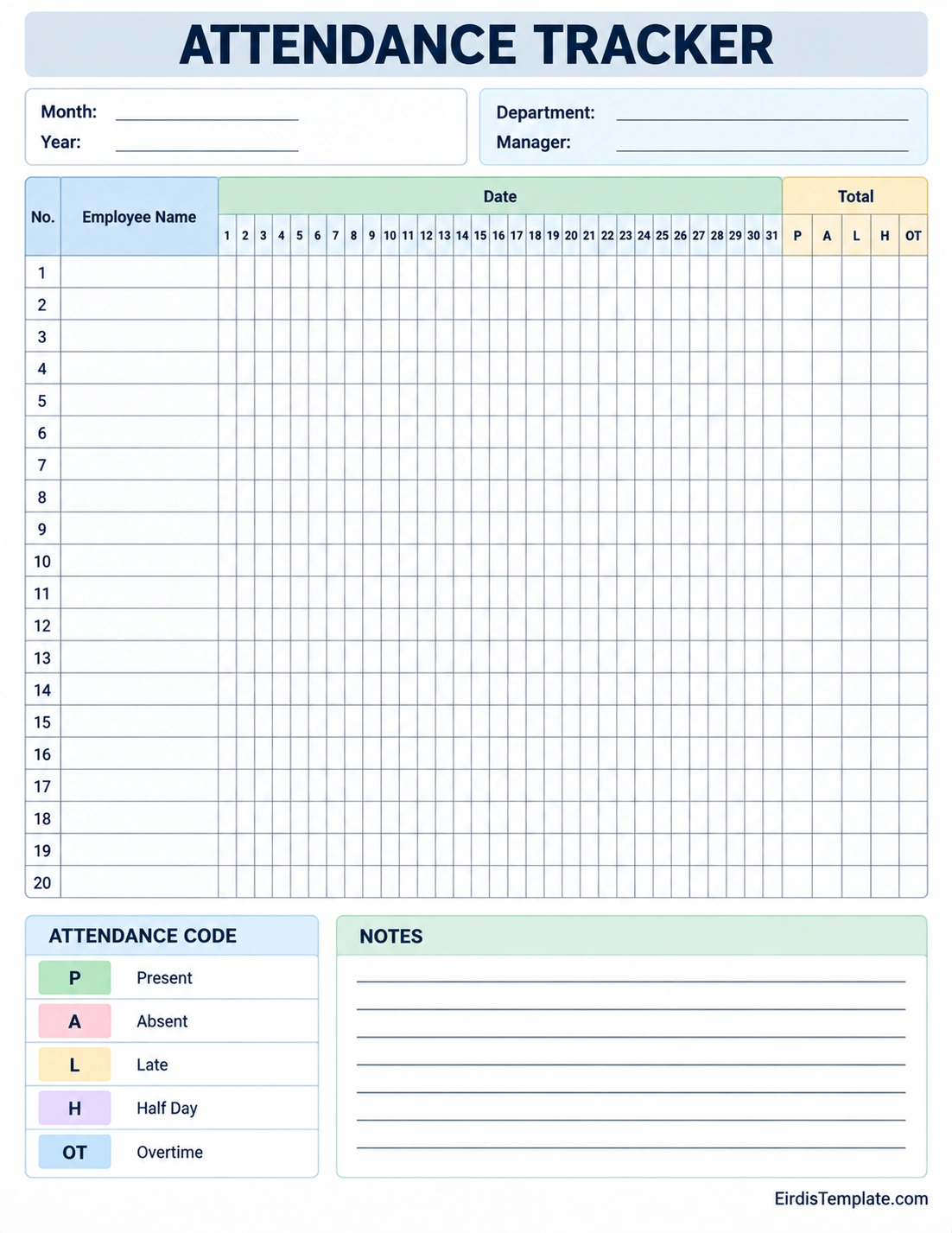
A printable attendance tracker template provides a straightforward way to organize employee attendance information in one place. A monthly format can include employee names, daily dates, attendance codes, totals, and a notes section.
The template can be printed for manual recordkeeping or adapted into a digital spreadsheet for easier calculations and reporting.
How to Use an Attendance Tracker
Using an attendance tracker is simple when the process is consistent. Establishing clear procedures also helps ensure that attendance information remains accurate.
1. Add Employee Information
Start by entering the names of employees who need to be tracked. For larger teams, include employee IDs, departments, or other identifiers to prevent confusion between employees with similar names.
2. Set the Tracking Period
Enter the applicable month, year, pay period, or reporting period. A clearly defined period makes the attendance record easier to organize and review.
3. Record Daily Attendance
Enter the appropriate attendance status for each employee each day. Use consistent codes such as Present, Absent, Late, Half Day, or Overtime.
4. Record Exceptions
Document approved leave, unusual schedules, or other relevant attendance exceptions according to company policy. Avoid using unclear abbreviations that other managers or payroll staff may not understand.
5. Review the Totals
At the end of the tracking period, review attendance totals and compare them with supporting records. If the tracker is used for payroll, verify important information before submitting it for payroll processing.
6. Store the Record Securely
Attendance information can contain employee-related data. Store completed records securely and limit access to authorized personnel according to your organization’s policies and applicable privacy requirements.
Types of Attendance Trackers
Different workplaces may need different approaches to attendance tracking. The best format depends on the size of the organization, work schedule, and level of detail required.
Monthly Attendance Tracker
A monthly attendance tracker records employee attendance for each day of a particular month. It is a popular format for small businesses, offices, schools, and departments.
Employee Attendance Sheet
An employee attendance sheet provides a basic record of presence and absence. It works well when the organization needs a simple attendance checklist without extensive time calculations.
Time and Attendance Tracker
A time and attendance tracker can include clock-in times, clock-out times, total hours worked, breaks, overtime, and other work-hour information. This format is more detailed than a basic attendance sheet.
Digital Attendance Tracker
A digital attendance tracker can be created in a spreadsheet or dedicated software. Digital tools can make sorting, calculating totals, filtering records, and generating reports easier.
Attendance Tracker vs. Timesheet
An attendance tracker and a timesheet are related but serve different purposes.
An attendance tracker primarily shows whether an employee was present, absent, late, or on approved leave. A timesheet generally provides more detailed information about hours worked, project time, tasks, or billable hours.
For example, an attendance record might show that an employee was present on Monday. A timesheet could show that the employee worked from 8:00 a.m. to 5:00 p.m. and spent specific hours on different projects.
Some organizations use both tools because attendance and detailed time tracking serve different administrative purposes.
Benefits of Using a Digital Attendance Tracker
A digital attendance tracker can provide several advantages over completely manual recordkeeping.
- Faster data entry: Employees or managers can update records electronically.
- Automatic calculations: Spreadsheet formulas can calculate attendance totals and working hours.
- Fewer calculation errors: Automated totals reduce repetitive manual calculations.
- Easy reporting: Attendance information can be sorted and summarized quickly.
- Better accessibility: Authorized users can access records when needed.
- Improved recordkeeping: Digital files can be organized by employee, department, month, or year.
However, digital tracking should be supported by appropriate access controls, backups, and data-handling procedures.
Tips for Maintaining Accurate Attendance Records
An attendance tracker is only useful when the information entered into it is reliable. Use these practices to improve accuracy:
- Update attendance records consistently rather than waiting until the end of the month.
- Use standardized attendance codes throughout the organization.
- Document approved absences and leave according to company procedures.
- Review unusual entries before finalizing the record.
- Compare attendance information with timekeeping records when appropriate.
- Keep employee information current.
- Restrict editing access to authorized users.
- Back up important digital records.
- Review the tracker regularly for missing or inconsistent information.
Common Attendance Tracking Mistakes
Even a simple attendance sheet can become unreliable if it is not maintained properly. Avoid these common mistakes:
Using Inconsistent Codes
If one manager uses “A” for absent and another uses a different abbreviation, the records can become difficult to interpret. Establish a standard attendance code system before using the tracker.
Updating Records Too Late
Entering several weeks of attendance information at once increases the risk of forgotten or incorrect entries. Daily or regular updates are usually more reliable.
Ignoring Corrections
If an employee’s attendance record changes because of an approved correction, update the record promptly. Keeping outdated information can create problems during payroll or attendance reviews.
Tracking Too Much Information
A tracker does not need every possible data field. Excessive information can make the document difficult to use. Include only the fields necessary for your attendance management process.
Failing to Protect Employee Information
Attendance records should be handled appropriately because they may contain employee information. Use secure storage and limit access to people who need the information for legitimate work purposes.
How to Choose the Right Attendance Tracker
Consider your organization’s needs before selecting or creating an attendance tracking template.
- Team size: A small team may only need a simple printable attendance sheet.
- Work schedule: Shift-based organizations may require more detailed time tracking.
- Payroll requirements: Determine whether attendance data must be combined with hours worked or overtime.
- Reporting needs: Consider whether managers need monthly, quarterly, or annual attendance reports.
- Digital access: Choose a spreadsheet or software solution if multiple authorized users need access.
- Privacy: Make sure employee records are stored and shared appropriately.
Frequently Asked Questions About Attendance Trackers
What is an attendance tracker used for?
An attendance tracker is used to record employee presence, absences, late arrivals, leave, overtime, and other attendance information. It can support workforce management, payroll processes, attendance reviews, and scheduling decisions.
Can I use an attendance tracker for payroll?
An attendance tracker can provide useful information for payroll, especially when it records attendance days, absences, leave, and overtime. However, payroll requirements vary, and some organizations need a more detailed timekeeping system to meet operational or legal requirements.
What is the best format for an attendance tracker?
The best format depends on your needs. A printable monthly attendance sheet is suitable for simple manual tracking, while a digital spreadsheet or dedicated timekeeping system may be better for larger teams and more detailed reporting.
Should an attendance tracker include hours worked?
It can, but it does not always have to. A basic attendance tracker may record only attendance status, while a time and attendance tracker can include clock-in times, clock-out times, breaks, and total hours worked.
How often should attendance records be updated?
Attendance records should generally be updated as close to the actual attendance event as practical. Daily updates can reduce missing information and make it easier to correct errors before payroll or reporting deadlines.
Can an attendance tracker be used for remote employees?
Yes. A digital attendance tracker can be adapted for remote employees by recording workdays, approved schedules, absences, leave, and other information required by the organization’s remote-work policy.
Is an attendance tracker legally required?
Recordkeeping requirements vary by location, industry, employee classification, and applicable employment laws. An attendance tracker can help organize records, but it should not automatically be assumed to satisfy every legal or payroll requirement.
Conclusion
An attendance tracker is a simple but valuable tool for organizing employee attendance information. By recording presence, absences, late arrivals, leave, and other relevant details, businesses can improve recordkeeping, support payroll processes, monitor attendance patterns, and make better workforce decisions.
For small teams, a printable attendance tracker template may be enough to maintain an organized monthly record. Larger organizations may benefit from a digital attendance tracking system with automated calculations, reporting, and access controls.
The most effective attendance tracking process is consistent, accurate, easy to understand, and appropriate for the organization’s operational and legal requirements.
Download: Attendance Tracker Template

- Bank Letter For Direct Deposit Template - October 6, 2026
- Background Check Authorization Form Template - October 6, 2026
- Free Autobiography Template (Word) - October 6, 2026
